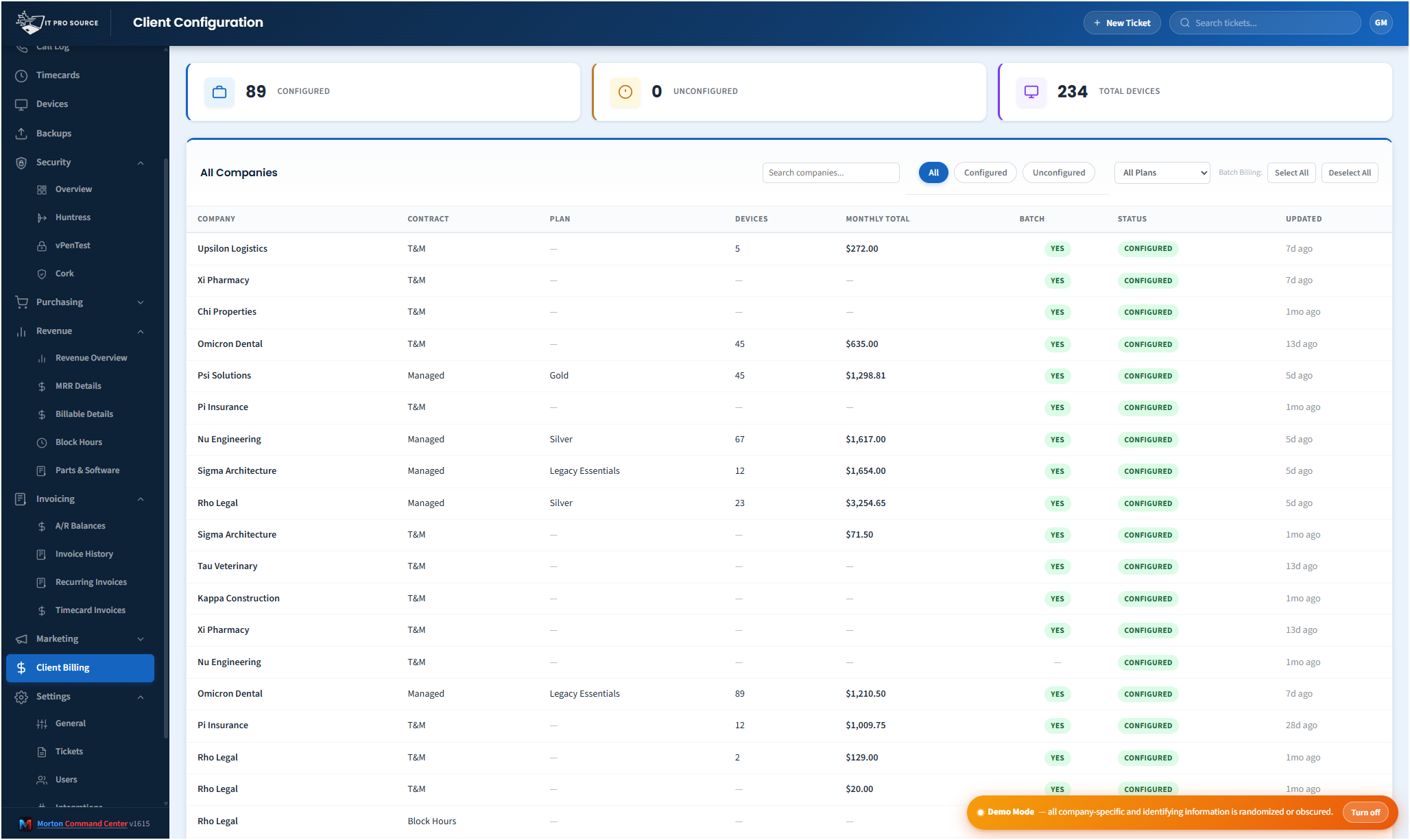
End-of-month billing at most MSPs looks like this: somebody pulls a device count from NinjaOne, a license count from Huntress, an order count from Pax8, opens a spreadsheet, copies them into the right rows for each customer, then re-types every line into QuickBooks. A half-day of careful copy-paste, every month. One typo on the device count and you under-bill a client for six months before anybody notices.
Morton Command Center collapses that into one click. Plans, services, devices, and licenses are configured per client and synced on a regular automated schedule: counts are current before each invoice batch. Dry-run preview shows you every line before anything posts. One click and 80 invoices land in QuickBooks Desktop ready to send.
Every contract shape, configurable per client
Your plan names, your labor classifications, your vendor mappings: configured to match how your MSP already invoices, not a templated default you have to retrofit.
- Managed plans with per-device rates (workstations, servers, mailboxes, network devices, MDM devices). Bronze / Silver / Gold / Platinum / custom: tenants build their own catalog rather than inheriting an ITPS-flavored default.
- A la carte services with volume tiers, customer-facing labels separate from internal names, and optional vendor sync per line.
- Block hours: both monthly installment plans (counted in MRR) and lump-sum prepayments. Drawdown tracking against actual labor.
- Time & Materials: billable labor sourced from timecards with per-tenant labor-type classification (onsite, remote, onsite_project, remote_project).
- Custom contracts: anything that doesn't fit the above. Per-company laborDefault setting decides included vs billable.
- Setup fees, recurring software resale, hosted services: each item type classified separately so MRR + billable + parts revenue stay distinguishable.
Automated vendor sync, per line
Each billable line opts into vendor sync independently. You don't sync the whole invoice. You sync the lines where automation pays off. Each sync connector is custom-built for your stack as part of your engagement; the sync targets a category of tool (your RMM, your security platform, your distributor) and the named vendors below are examples of integrations we build:
- Your RMM (device counts): workstations, servers, network devices synced from the customer's org on a regular automated schedule. Adds and removals flow through to the next billing run without any manual reconciliation. Running NinjaOne, Datto, Kaseya, Atera, or another RMM with an API? We build that connector custom to your stack.
- Your security platform (license counts): for example, Huntress agents_count, billable_identity_count, logs_sources_count, sat_learner_count fetched per company. Your EDR + ITDR + SIEM + SAT licenses bill at the actual deployed count, not last quarter's spreadsheet, and any security vendor with an API (Huntress, SentinelOne, CrowdStrike, Sophos, whatever you deploy) gets its sync built the same way.
- Your distributor (quantities + prices): for example, Pax8 subscription quantity and supplier price synced on the same automated schedule. Microsoft seat-add-and-remove churn doesn't require any manual reconciliation. Any distributor with an API (Pax8 or otherwise) gets a connector built custom to your stack.
Sync RMM devices on a cyber line, sync distributor quantities on the M365 line, leave T&M and block hours manual. Mix and match per client without rebuilding the whole invoice. If your tool has an API, we build the integration for you, custom to your stack.
Dry-run preview before anything posts
Open any company's billing page. Hit Preview. See every line item, every quantity, every rate, the subtotal, the discount, the total. See what changed since last month (device counts went up, a license got removed, a custom item was added). Catch mistakes once a month, not once a quarter when a client emails you.
Dry-run is a real engine pass: same code that generates the actual invoice. No "looks right but the real one drops a line" risk.
One-click batch into QuickBooks Desktop
Pick a month, pick clients (or "everyone marked included in batch"), click Run. The engine respects each client's billing frequency, anchored to that client's own renewal date rather than the calendar: monthly clients every month, and annual or quarterly clients in the month they actually renew (a client who renews in June bills in June, not January). It batches creation in 15-company chunks to stay under Cloudflare Worker timeouts. Idempotency keys prevent duplicates on retry. Every invoice posts straight into your accounting system: we build your QuickBooks Desktop integration (via the Conductor agent) as part of your engagement, ready to send.
Per-company success and failure reporting tells you exactly what landed and what didn't, without you having to scroll through QB to verify.
Your accounting system stays exactly where it is: Morton Command Center writes invoices into it; it doesn't replace it or warehouse a copy. We build your QuickBooks Desktop integration via the Conductor agent, and because the platform is API-driven, any accounting system with an API (QuickBooks Online, Xero, Sage, FreshBooks, or whatever you run) gets its connector built the same way, custom to your stack as part of your build.
Item taxonomy + recurring-item index
Every QuickBooks item is classified per tenant: LABOR / RECURRING / PRODUCT / SETUP_FEE / CREDIT / OTHER. This drives the revenue dashboard's breakdown (MRR vs billable labor vs parts revenue vs setup fees) and prevents double-counting: recurring lines that are already in a customer's monthly plan don't get re-counted as billable labor when they show up on invoices.
An item-history backfill scanned 12 months of QB invoice history and inferred which items were recurring for which customer, even when the operator never explicitly mapped them. Items that USED to be in a plan and got swapped (Essentials → Silver migration) are recognized correctly on past invoices.
Audit trail + concurrency control
Plan changes, item-mapping changes, and rate changes are timestamped with who made the change. Optimistic concurrency tokens prevent two operators from silently overwriting each other when editing the same client's billing config simultaneously: the second save gets a 409 conflict with a clear "your colleague changed this; refresh and try again" message.
Per-line vendor failure tolerance
Vendor counts are cached from recent automated syncs, so billing uses the last successful sync rather than a live call at invoice time. If a sync run encounters a vendor outage or partial response, the previous cached values hold. Lines don't zero out, and vendor issues don't cascade into an empty invoice. The dry-run preview lets you catch any stale or missing counts before anything posts to QuickBooks.
Running a different RMM, a different security vendor, or a different distributor? If your vendor exposes an API, we build the sync connector during your custom build: the billing engine is vendor-agnostic by design. Your tools stay the source of truth; nothing migrates.
Pricing
Flat monthly pricing, with no per-seat fees, no per-vendor surcharge, no per-client charge. Add ten more clients to your billing batch and your Morton Command Center bill doesn't move. See current pricing on the homepage →
See it running
The live demo is a full Morton Command Center tenant with realistic MSP data. Click into the billing module yourself before you talk to anyone. For the commercial picture, Automated MSP Invoicing covers what this changes about your week.
Ready to talk?
The first call is a 30-minute discovery: we map your current contract types and billing workflow and figure out where the catalog needs to land on day one. No commitment, no sales pressure.
Questions first? Email [email protected] or read the FAQ.