Most MSPs end up with the same problem: a company lives in Freshdesk, its devices live in NinjaOne, its billing contact lives in QuickBooks, its Office 365 users live in M365 admin, and somebody's spreadsheet tracks who the renewal contact is. When a tech needs to reach the right person about a license renewal, they have to know which system to open. When a salesperson wants to send a quote, they're guessing at who the purchase approver is. When somebody leaves the customer's company, nobody knows which of the five places to delete them from.
Morton Command Center pulls every vendor's company + contact records into one directory and adds the structured roles your team actually thinks in.
What's unified
- Your PSA companies and contacts (built to your PSA as part of your engagement; if it has an API, we build the integration, custom to your stack), merged into one list with source badges so you can see where each entity originated. Per-tenant configurable mode: vendor-only, native-only, or merged. If your PSA has an API, we build the integration that feeds this directory.
- Native (Morton Command Center-stored) companies and contacts, for prospects and clients who haven't been onboarded into your PSA yet: sales leads convert without leaving the platform.
- Microsoft 365 mailbox users, fetched on demand. One click and you see a diff: who's new in M365 but missing from your PSA, who's still on file but no longer in the tenant, who has email mismatches.
- Your accounting system's customer records, linked by mapping so the Invoices tab on every company resolves to that customer's invoice history without you having to bounce to the accounting tool. We build your accounting integration custom to your stack: because the platform is API-driven, any accounting system with an API (QuickBooks Desktop, QuickBooks Online, Xero, Sage, NetSuite, or whatever you run) is built the same way as part of your engagement.
- Your distributor's license assignments: surfaced as separate badges from M365 since "who supplies the license" and "who has a mailbox" are different questions. We build your distributor integration custom to your stack; any distributor or licensing platform with an API (Pax8 or whatever you run) is wired the same way for you.
Your PSA remains the system of record. Morton Command Center reads from it and renders a unified view: cancel and your data is exactly where you left it, untouched. Which vendors feed the directory, which tabs appear, and which roles matter are all shaped during your build, so you get a directory that matches how your team actually thinks, not a generic template.
Contact roles that mean something
Every contact can be tagged as Primary Contact, Backup Contact, or Purchase Approver: structured roles the whole platform reads. Your build can add additional role types shaped around how your team works (Security Contact, Billing Contact, After-Hours Contact, and any others you need):
- Email Marketing campaigns let you target by role ("send this price-change notice to billing contacts only").
- Sales Leads surfaces the tagged Purchase Approver so your team knows exactly who to contact when it's time to close.
- Tagged roles surface the right recipients when building quotes: no more guessing who the approver is.
- Contacts get portal access scoped to their company: they see only their own client's data.
- With tagged roles visible from the ticket detail, your team always knows who the right contact is for this client, with no tab-switching to find the backup contact.
Roles live in a single canonical KV record per company, so changes propagate everywhere immediately. The legacy "tag contacts as PRIMARY in Freshdesk and hope" workflow is replaced.
Microsoft 365 sync with diff preview
Open any company. Hit the M365 Sync button. Morton Command Center fetches the live list of mailbox users from the tenant and shows you:
- To Add: M365 users with no matching contact in your PSA
- To Remove: contacts in your PSA who no longer have a mailbox (offboarded employees, name changes, etc.)
- To Mark Inactive: disabled M365 accounts that still have a contact
- Email mismatches: same person but the email in your PSA doesn't match the M365 primary address
You review the diff and approve the changes you want. No more "is this email still good?" guessing.
10+ tabs on every company detail page
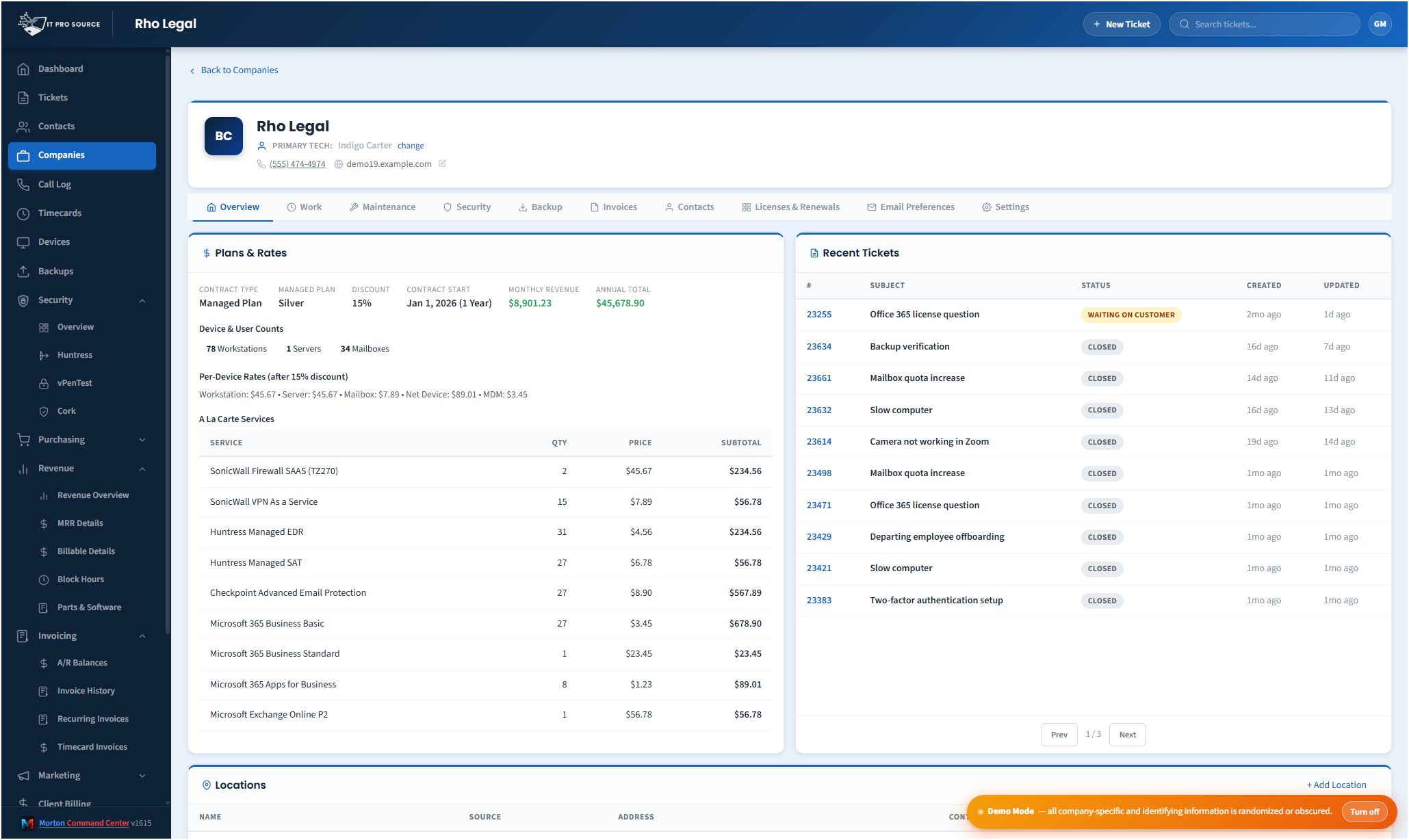
Open a company and you don't bounce back to other systems. Overview (KPIs, plans, recent tickets), Work (included vs billable items), Maintenance (automated fixes from your RMM), Security (EDR + posture, fed by the security tools we integrate for you), Backup (per-device backup health), Invoices (accounting history, fed by the accounting integration we build for you), Contacts (company-scoped roster), Licenses + Renewals, Plans & Rates, Email Preferences, Onboarding (completion %), Settings. Each tab loads only when clicked: fast initial paint, lazy detail. Every tab is fed by an adapter, so whichever RMM, EDR, accounting, or security tool you run can populate it: if your tool has an API, we wire the adapter during your build.
Cross-source visibility, no silent duplicates
Because records come from multiple sources, the same person can appear more than once. Morton Command Center keeps that visible rather than hiding it: the source badge on every record tells you exactly where each entry originated, so you always see both copies and decide what to do. A one-click merge/dedupe workflow is on the near-term roadmap; today the value is that nothing is silently collapsed behind your back.
In-flight onboarding tracker
The Companies list has a dedicated "Companies in Onboarding" panel showing every client currently mid-rollout with their plan, start date, and completion percentage. Click any row to jump to that company's Onboarding tab, where the per-vendor checklist (M365 tenant created, RMM org provisioned, EDR agents deployed, etc.) shows what's done and what's outstanding. The checklist is built custom around whichever RMM, EDR, and other tools your stack runs.
Demo mode for screenshots + training
Every company name, contact name, email address, and phone number obscures consistently when demo mode is toggled: the same entity always renders as the same pseudo-name across pages so screenshots feel coherent. Perfect for sales decks, training videos, or screen-shares with prospects.
Pricing
Flat monthly pricing, with no per-seat fees, no per-vendor surcharge. See current pricing on the homepage →
Ready to talk?
The first call is a 30-minute discovery: we map your existing PSA + RMM + M365 setup and figure out which sources need to merge on day one. No commitment, no sales pressure.
Questions first? Email [email protected] or read the FAQ.