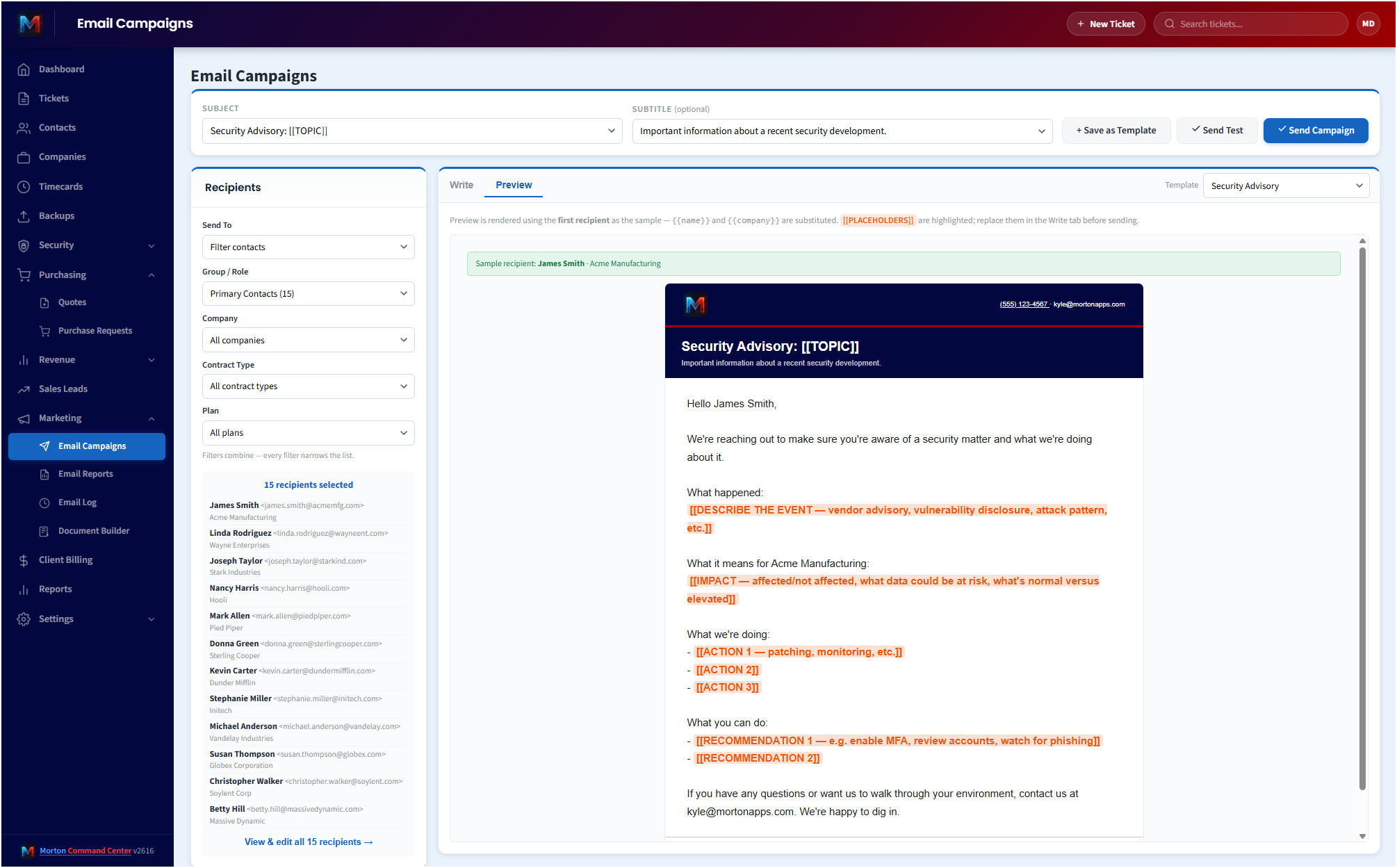
Most MSP platforms leave client communication to a separate (and expensive) marketing tool. MailChimp, HubSpot, Constant Contact: $50–$300 per month per MSP, separate logins, separate contact lists that drift out of sync with your PSA, separate brand templates that look nothing like your invoices. And every report you'd want to send a client (ticket activity, backup status, security posture, billable-vs-included summary) ends up being something a tech has to copy-paste into the marketing tool once a month, assuming anybody remembers.
Morton Command Center includes it. The campaigns. The reports. The branding. The delivery. The audit log. Email marketing and automated client reports are built-in capabilities: they're on from day one, no additional subscription, no per-recipient fees, no separate login.
Targeted recipient resolution
Recipient lists resolve live from your existing company and contact records: the same data your ticketing and billing already use. No CSV import, no list to keep in sync, no duplicate contacts drifting out of date.
- By company: pick one customer or a set; recipients resolve to the company's contacts.
- By contract type: "send to every Managed client" or "every Managed+Cyber client." Filter sources from your billing catalog, so adding a new contract type adds a new audience.
- By contact role: primary + backup contacts, or purchase approvers only. Roles live in a structured KV record per company, not buried in tags.
- By tag: anything tagged "Security Contact" or "Billing Contact" or whatever custom tag your team uses.
- By pasted list: paste raw emails for one-off blasts to vendors / partners / prospects.
Audience preview shows the deduplicated recipient count + emails before you hit Send. Filters compose: "every Managed client's billing contacts only."
Six automated client reports
Configure once, fire on schedule (daily / weekly / monthly with day + time-of-day offsets):
- Included Work Summary: time-tracking hours that landed under each client's plan during the period, by tech, with descriptions (we build your time-tracking integration, eBillity or any time-tracking system with an API, custom to your stack, and it feeds this same report). The "see what you got" QBR ammunition delivered automatically.
- Billable Work Summary: the same shape but for billable-classified work. Hours, labor value, dollar cost. Sent to billing contacts ahead of the invoice.
- Ticket Activity Report: counts, breakdowns by status, top issues. Weekly recap to primary contacts.
- Backup Status Report: your backup platform's jobs with last-success / streak / failures. We build your backup integration custom to your stack: for tools with an API we read jobs directly, and for tools without an open API we ingest status from the alert emails they already send. Any backup platform (API or email-alert) gets wired into the same report as part of your build. Per-job streak counts show rolling reliability over consecutive successful days, not just last week's snapshot.
- Security Advisory: incidents and findings from your security stack. We build your security integrations custom to your stack: any EDR or pen-test tool with an API (Huntress, vPenTest, or anything with an API) gets wired in as part of your build, with Morton Command Center's remediation overlay so the report reflects what's actually resolved, not just what the vendor flagged. (The overlay reflects status tracked in Morton Command plus, for Huntress, the approve/reject actions Morton Command relays back to Huntress; Morton Command does not auto-remediate, quarantine, or block on its own.)
- Maintenance Report: a summary of the automated-maintenance work logged for each client during the period (the autofix-classified time entries), so customers see the proactive upkeep that happened on their behalf.
Every report pulls from your connected tools: your time-tracking system for time data, your ticketing system for ticket counts, your RMM and backup platforms for backup health, and your security stack for findings. Every one of those integrations is built custom to your stack as part of your engagement. Proven patterns stand up faster, and where your stack is new to us we build it to fit. If your tool exposes an API (or sends alert emails we can parse), we build that integration for you, custom, as part of your build. Nothing is off the table. Report data refreshes on a near-real-time schedule (cron-warmed on short cycles, plus a manual refresh), so it tracks your stack rather than a stale weekly snapshot.
Each report config tracks lastRun timestamp and status so the dashboard shows "delivered Wednesday" or "skipped: every recipient opted out" without you having to dig.
Branded delivery, every email
Every email (campaign or scheduled report) wraps in your brand: logo at the top, your brand-color header with accent stripe, your company name, your support phone, your info email in the contact bar. Outlook 365 web, Outlook desktop, Gmail, Apple Mail: all render consistently. We've tuned the email markup against the quirks of every major mail client so what you compose is what every recipient sees.
Five built-in templates ship: Service Outage, Planned Maintenance, New Service, Resolved Outage, Security Advisory. Operators can clone any of them and save up to 50 custom templates per tenant. {{name}}, {{company}}, {{your_company}}, {{support_email}} placeholders fill per-recipient so a 500-contact blast feels like 500 individual emails.
Opt-out enforcement
Per-company preferences gate every automated send. A customer can opt out of all automated reports entirely. For campaign sends, per-report-type preferences let them stay on security advisories but skip billing summaries, whatever they prefer. Preference check happens at send time, so toggling Hinds Hospice off this morning means tonight's backup report skips them. Transactional emails (invoices, tickets) always deliver; only marketing / reporting respects opt-outs.
The Customer Portal exposes the toggles to clients so they can manage their own preferences without a support ticket.
Full audit log
Every email (subject, recipient, sender, timestamp, message id, status (sent / failed), error if any, sentBy attribution) captured in a 500-entry rolling log. Inbound monitoring alerts (from upstream vendors that bounce into your inbox) are logged separately so you can see exactly what hit your platform and what didn't deliver. No exporting to a third-party dashboard.
Test mode
Every report has a "test send to me" mode. Fires one email per matching company (aggregated recipients, not per-recipient) to your address. Skips preference checks. Doesn't update the lastRun metadata. Perfect for tuning a new report config before pointing it at real clients.
Pricing
Flat monthly pricing: email marketing and all six report types included. No per-recipient fees, no per-campaign charges, no MailChimp tier to outgrow. Hire ten more techs or add twenty more clients and your email bill doesn't change. See current pricing on the homepage →
If your clients need a report type not listed above (asset inventory, software license expiration, contract renewal reminders), that's a build-phase conversation. Because this is a one-of-one platform, new report types get added as your needs evolve, not when the vendor decides to ship them.
See it running
The live demo is a full Morton Command Center tenant with realistic MSP data. Click into the campaign surface yourself before you talk to anyone. For the commercial picture, MSP Email Marketing covers what this changes about your week.
Ready to talk?
The first call is a 30-minute discovery: we map what you'd want to send clients automatically (and what you've been doing manually) and scope the integrations and reports we'll build for your stack. No commitment, no sales pressure.
Questions first? Email [email protected] or read the FAQ.