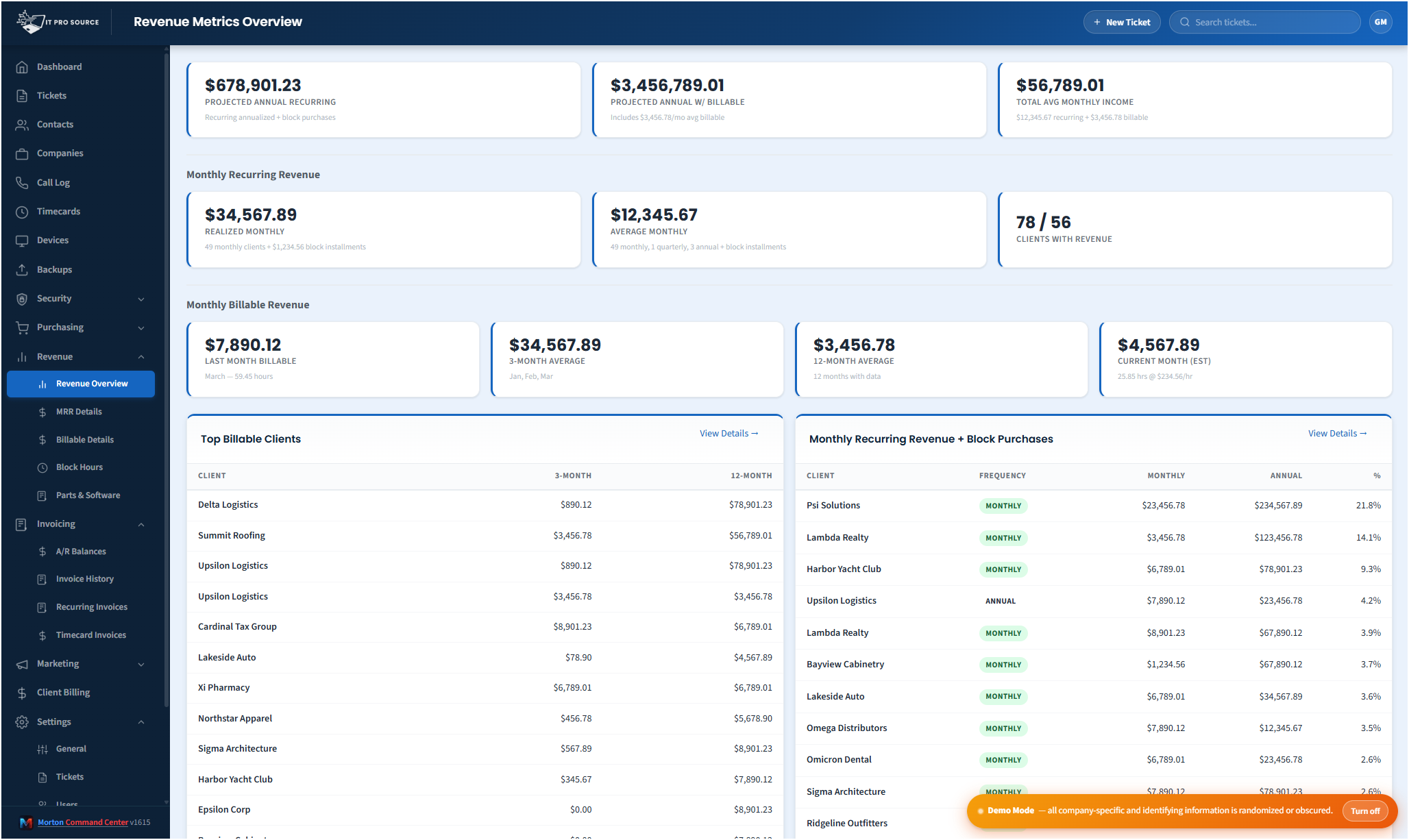
MSP revenue dashboards usually fall into one of two ditches. Either they're optimistic spreadsheets, quoting "we're at $80k MRR" from the plans you are supposed to be billing rather than what you actually invoiced, or they're accounting-software reports (QuickBooks, Xero, Sage, take your pick) built for a CPA, not for the person trying to run an MSP. Both miss the questions you actually have: how much did each client pay last month? Did the new Silver plan migration take? Is February's spike real or noisy? What's the projected revenue if this month's pace holds?
Morton Command Center grounds every number in your accounting system's invoice history and rebuilds the engine around the questions an MSP owner asks daily. The revenue engine itself is a native feature, included out of the box. The connector that feeds it your invoices is built custom to your stack as part of your engagement: the platform runs on a vendor-agnostic adapter pattern, so whatever accounting system you run, whether that is QuickBooks Desktop, QuickBooks Online, Xero, Sage, NetSuite or anything with an API, we build that integration for your shop rather than asking you to switch tools. During your build, we map your item taxonomy, your contract shapes, and your plan names into the engine, so the MRR breakdown reflects your billing structure rather than a generic template.
Top KPIs you can trust
- Projected ARR Annual recurring plus block-hour purchases. The number you'd quote a buyer.
- Average Total Monthly Revenue MRR plus 12-month average billable labor. The "what should I expect this month" figure.
- MRR Recurring contracts only, predictable each month. The figure that doesn't move when a busy month happens.
- Outstanding AR Total positive customer balance, straight from your accounting system. Click-target for collections.
A scope caption directly above the cards spells out exactly what's included: "Top KPIs reflect recurring service revenue + billable labor only. One-time parts, software, and shipping appear on the Total Invoiced chart below." No buried assumptions.
Per-month historic MRR, from invoices rather than a flat baseline
The 12-month trend chart isn't a horizontal "your current MRR projected backwards" lie. Under the hood, a recurring-revenue engine walks every invoice line, classifies it by your item taxonomy and customer billing config, and powers the MRR breakdown by contract type. The result: February's annual-payment spike shows up. The Essentials → Silver plan migration shows up as a step change. The reality you bill is the reality the chart reflects.
Total Invoiced chart: the inclusive view
Right next to the MRR-aware trend, a Total Invoiced chart sums every dollar invoiced per month: labor, parts, software, shipping and credits. Matches your AI-style "sum the invoices for last month" cross-check exactly. Useful when you want to see total cash-flow shape vs the predictable-revenue shape side by side.
Current month so far + projected end of month
The Current Month card on the Monthly Billable Revenue strip splits the cell: MTD on the left (with day-of-month and hours-so-far context), projected end of month on the right (linear projection of the current pace). At a glance you know both where you stand AND where you'll likely land if this week's pace holds.
Top clients, by MRR and by billable hours
Two bottom panels, 50/50 split:
- Monthly Recurring Revenue + Block Purchases Sorted by annualized recurring value, highest first. Frequency pill (monthly / quarterly / annual), monthly recurring amount, annual figure including block-hour purchases.
- Top Billable Clients Sorted by 12-month billable revenue. 3-month vs 12-month columns to see whose billable activity is trending up.
Unmapped-items warning banner
When customers have billing-config items that don't resolve to an item in your accounting system (a QuickBooks item, or the equivalent in whatever platform we've integrated for your stack), those lines silently leak into Other Revenue and quietly inflate it. The unmapped-items banner sits directly above the hero KPIs whenever any customer has unmapped recurring items, naming the count and the monthly leak total with a one-click link to the audit page. The bug that used to hide for months is now in your face until you fix it.
Block hours: what counts as recurring and what doesn't
Block hours confuse revenue reporting because two different things share one name. A client who buys a lump of hours up front is a one-time bump. A client on a monthly block plan is recurring. Morton Command Center separates them: lump-sum purchases are totaled for the year but kept out of MRR, monthly block plans are counted in it, and a separate strip below the Billable Revenue cards shows how many clients are on block plans and what those hours are worth. No more wondering whether last quarter's number was real.
Demo mode that respects screenshots
Every dollar, every customer name, every hours figure obscures consistently when demo mode is toggled, so the same entity always renders as the same pseudo-value across the page so screenshots feel coherent. Great for sales decks, training videos, and screen-shares.
Your accounting system stays where it is
Morton Command reads from your existing accounting data, with no migration, no parallel entry and no cutover. Your invoices, your customers, your history stay exactly where they are. Worst case you cancel and your books are untouched. The integration is built custom to your stack: whether your shop runs QuickBooks Desktop, QuickBooks Online, Xero, Sage, NetSuite, or any other accounting platform that exposes an API, we build the connector for your exact setup as part of your engagement. If it has an API, we integrate it. That's the advantage over rigid all-in-one suites that force you onto their pre-built connectors: yours is built to fit your tools, not the other way around.
Pricing
Flat monthly pricing, with no per-seat fees and no per-vendor surcharge. See current pricing on the homepage →
See it running
The live demo is a full Morton Command Center tenant with realistic MSP data. Click into the revenue views yourself before you talk to anyone. For the commercial picture, MSP Revenue Dashboard covers what this changes about your week.
Ready to talk?
The first call is a 30-minute discovery, where we map your accounting taxonomy (QuickBooks or whatever you run), your contract types, and the questions you'd want this dashboard to answer on day one. No commitment, no sales pressure.
Questions first? Email [email protected] or read the FAQ.