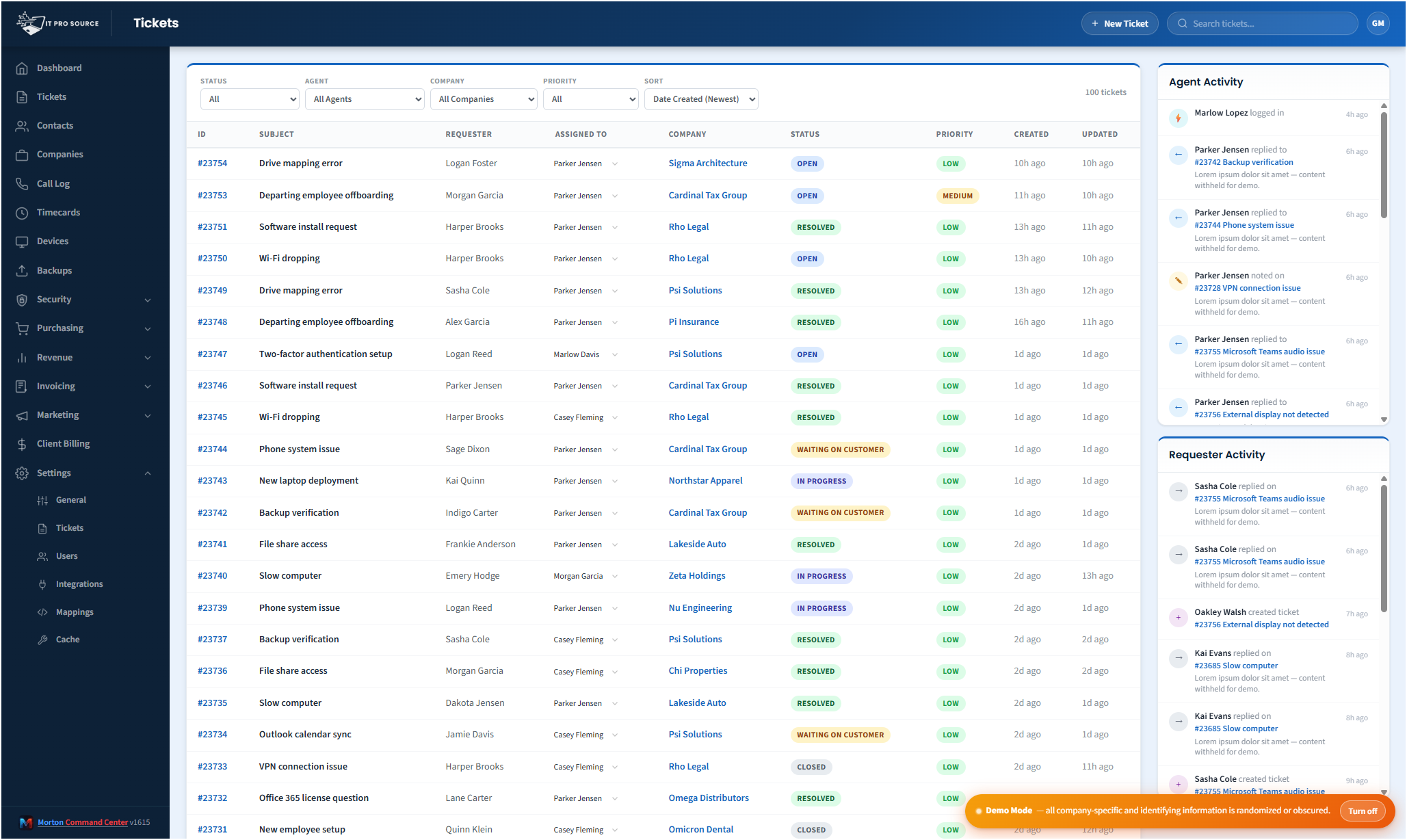
If your MSP runs more than one PSA (and most do, even if they don't call it that), your techs spend their day toggling between consoles. Freshdesk for some clients, NinjaOne tickets for others, an old ConnectWise instance for the customer that refuses to migrate, maybe a HaloPSA install you took over from an acquisition. Each console has its own status codes, its own priority scheme, its own search syntax, its own attachment rules. The result: techs forget where a ticket lives, customer replies sit unread for hours, and the daily standup turns into "wait, what queue is that in?" This is where custom beats a rigid all-in-one suite: instead of forcing your team onto a vendor's pre-built connectors and whatever subset of tools they happen to support, every build starts with a discovery call where we map your actual PSA stack, then we custom-build each integration to match your workflow, not a generic template.
Morton Command Center pulls every ticket from every vendor into one queue. Same filters, same status terminology, same conversation view. Your techs work in one place; the vendor consoles stay as the source-of-truth backends. Your PSA stays the system of record: Morton Command reads from it and surfaces a unified view. Nothing migrates.
What's actually unified
- Multi-vendor ingestion: every PSA integration is custom-built for your stack via the same vendor-agnostic adapter contract. Freshdesk, NinjaOne, ConnectWise, HaloPSA, Autotask, Zendesk, ServiceNow, or whatever you run gets built the same way as part of your engagement. The rule is simple: if your tool has an API, we build the integration, custom to your stack.
- Normalized status hierarchy: Freshdesk's 2/3/4/5 and NinjaOne's 1000/2000/5000/6000 status codes get abstracted to one set: open / pending / waiting on customer / resolved / closed. Each vendor we integrate for you is mapped into the same set, so you filter by "open" once and see every open ticket, regardless of which vendor stored it.
- Near-real-time webhook ingest: PSA webhooks feed customer replies, status changes, and assignment updates into the activity stream with ~5–30s latency. No more 5-minute polling windows missing the customer who replied 90 seconds ago. Any PSA that exposes webhooks (Freshdesk, NinjaOne, ConnectWise, HaloPSA, Autotask, Zendesk, ServiceNow, or whatever you run) feeds the same stream once we build that integration for your stack.
- Watched tickets: star any ticket as "watched" and any update (customer reply, agent note, status change, new attachment) surfaces in your watched feed without you having to refresh the queue. Across vendors. Across agents.
- "Needs attention" indicator: a red dot flags tickets where the requester has replied since the last agent response. Multi-agent seen-state prevents the dot lingering after a teammate has already triaged it: the team's collective inbox, not just yours.
- Full conversation view: customer replies, internal notes, status changes, and attachments rendered in a single timeline. Both legacy vendor threads AND Morton Command Center's own side conversations show in the same scroll.
Automatic per-agent time tracking on every ticket (built in, no third-party subscription required)
The feature MSPs typically realize they've been missing five minutes after the demo. Open a ticket, your timer starts. Open the same ticket as a different agent, your timer starts independently. Switch tickets, the old timer pauses. Resolve a ticket, every agent who touched it submits their captured time in one batch, or each tech reviews their own time first, depending on the tenant's policy.
The math: every minute spent inside Morton Command Center on a ticket is automatically attributed to the agent who spent it, on the customer it belongs to, with the ticket reference, the activity class (onsite vs remote vs included vs billable), and the customer's contract context already resolved. End-of-day timecard reconciliation goes from a half-hour of "wait, what did I do this morning?" to zero.
Per-agent KV-backed timer records mean four techs can be on the same emergency ticket simultaneously without their timers stomping each other. The Timecards tab adds a third view (Unsubmitted Time) that lists every chunk currently tracked but not yet submitted to your time-tracking system: the Morton Command-native timecard store is included out of the box, and any external time-tracking or billing tool with an API (eBillity, QuickBooks, or anything with an API) is custom-built into your stack as part of your engagement, so nothing escapes invoicing because a tech forgot to hit submit. RBAC scopes the view: techs see their own, finance + admin see everyone's.
This is the difference between a unified ticket queue and a unified ticket queue your billing engine actually trusts.
Side conversations, CC-native
Side conversations (the internal email threads attached to a ticket that you'd normally use for vendor escalations or internal back-and-forth) used to depend on each vendor. Freshdesk had child tickets. NinjaOne had linked threads. Each was a little broken in a different way.
Morton Command Center moved side conversations to its own infrastructure: managed outbound delivery, HMAC-secured reply routing, secure thread storage. Side conversations now work identically across ticketing vendors. Legacy vendor-side threads still render read-only for historical context.
Bulk actions across up to 100 tickets
End-of-month cleanup: mark 60 stale "resolved" tickets as closed. New tech onboarded: reassign 40 tickets from "Cameron" to "Christian." Acquired client gets re-tagged: update company on 80 tickets at once. Mass-update status, priority, assignment, group, company, and tags in batches of 100, with per-ticket success/failure reporting and full RBAC enforcement so techs only touch what they're scoped to.
R2-backed attachments for vendor gaps
NinjaOne's REST API doesn't expose comment attachments, for example. That meant attachments uploaded inside Ninja stayed locked there: visible in the Ninja UI but invisible everywhere else. Morton Command Center maintains its own attachment index in KV and stores files in R2 (Cloudflare's S3-compatible object storage), so any attachment uploaded through Morton Command Center is searchable and downloadable from anywhere, even when the vendor API can't surface it. The same fallback covers any PSA or RMM with a similar API gap: the storage layer is vendor-agnostic, so whatever tool you run, attachments stay accessible.
Per-agent attribution
Each tech can wire in their own PSA API key, and because attribution rides on the same API-driven pattern every integration we build uses, any PSA with per-user API credentials (Freshdesk, NinjaOne, ConnectWise, HaloPSA, Autotask, or whatever you run) works the same way once we build that integration for your stack. When they reply from Morton Command Center, the reply lands in the vendor as if posted by them personally, preserving attribution in your customer's audit trail and your team's vendor-side metrics. The tickets show up under the actual technician's name in source systems, not "some service account."
Scope-aware caching
Stale windows are tuned per filter type: 60 seconds for fast-moving status-filtered dashboards, 30 minutes for company-scoped queries where the data barely changes. Hard stale block at 10 minutes ensures the queue never silently serves week-old ticket lists. Combined with the webhook live feed, your techs see customer replies within seconds.
Pricing
Flat monthly pricing, with no per-seat fees, no per-vendor surcharge. See current pricing on the homepage →
See it running
The live demo is a full Morton Command Center tenant with realistic MSP data. Click into the ticket console yourself before you talk to anyone. For the commercial picture, MSP Help Desk Dashboard covers what this changes about your week.
Ready to talk?
The first call is a 30-minute discovery: we map your existing PSA stack and scope the integrations we'll custom-build for it. No commitment, no sales pressure.
Questions first? Email [email protected] or read the FAQ.