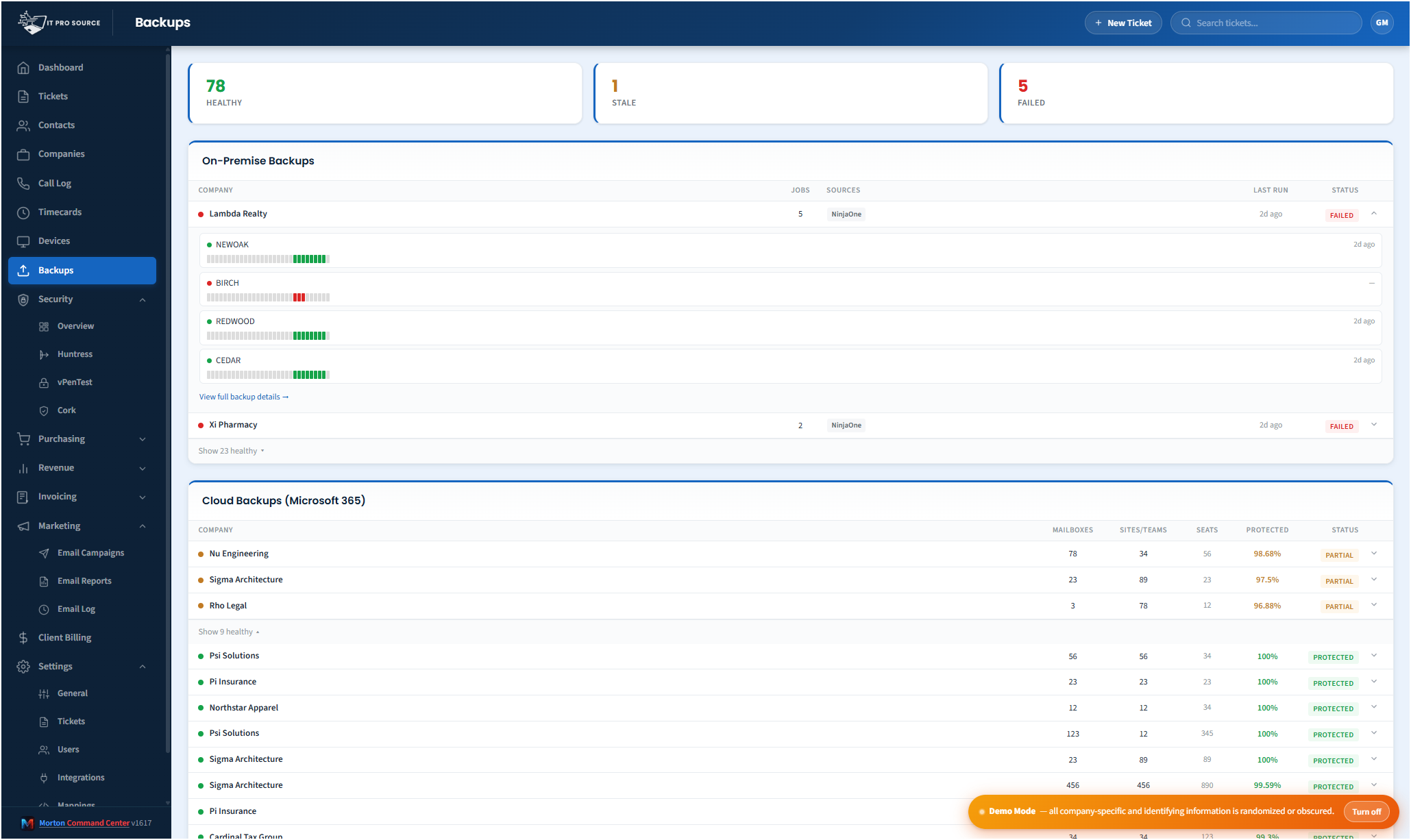
Most MSPs run multiple backup vendors across their client base. One client is on Datto. Another runs Veeam on-prem. A third is on Cove. M365 mailboxes get backed up by something separate. Synology owners use Synology's built-in tooling. Each vendor has its own console, its own alert format, its own definition of "successful." Knowing whether last night's backups all completed cleanly across your entire client base requires logging into four to six places.
Morton Command Center pulls every backup status into one operational view.
What gets unified
- Server-class backups from Veeam, Datto BCDR, Acronis, Barracuda, and other on-prem platforms.
- SaaS workload backups: Microsoft 365, Google Workspace, and cloud apps backed up by Datto SaaS Protection or similar vendors.
- Microsoft 365 backups: whatever you run today. We build the connector for your M365 backup vendor (Datto SaaS Protection, AvePoint, Skykick, Veeam M365, or anything else), via direct API or email-ingest, whichever the tool exposes, as part of your build.
- NAS / Synology backups from Synology HyperBackup and other NAS platforms, wired into your view via the path each vendor supports.
- Endpoint backups where applicable.
Every backup vendor in your stack gets its own connector, custom-built for you as part of your engagement: there is no fixed list of "supported" tools to fit yourself into. Some vendors expose a direct API pull. Others send nightly notification emails that Morton Command parses automatically. Either path lands in the same unified view, and we pick whichever one your tool supports. If your tool has an API or sends alert emails, we build that integration, custom to your stack. That's the whole point. Throughout, this is monitoring only: your existing tools stay exactly where they are, nothing migrates, and Morton Command never runs, restores, or touches the backup jobs themselves.
The "healthy clients collapsed" view
The default dashboard is structured by exception. Clients with all backups green are collapsed into a single row. Clients with any failure surface fully expanded with the failure details inline. The view is, by default, what needs attention, not a wall of green you have to scan.
One click expands a healthy client if you need to verify state. One click into a failure shows the device, the last successful run, the last failure detail, and a link to the source vendor's console for action.
Per-customer backup posture
The unified view also generates a per-customer backup summary that shows up in every company view in Morton Command Center. Clients with a backup gap (no recent successful run on a critical machine) get flagged. This rolls up into the security posture too: backup readiness is part of incident response. Stale thresholds, device classifications, and which vendors feed the view are all configured around your specific stack during the build, not a one-size-fits-all default.
Why bothering with this matters
Backup failures are the most common "we have it covered" gap at MSPs. Everyone says they monitor backups. In practice, alerts get muted, vendor consoles get checked weekly instead of daily, and the failure that matters (the one before a ransomware event) sits unaddressed because it didn't make enough noise. Putting every signal in one screen, structured by exception, fixes this in the most basic way: you cannot miss what you can't avoid seeing.
The reporting follow-through
Beyond live monitoring, Morton Command Center generates weekly and monthly backup reports per customer: ready to attach to QBR documents or send proactively. The reports include the rolling success rate, recent failures and their resolutions, and a posture summary. Customers stop wondering whether you're really watching, because you can prove it on cadence.
Backup is one rollup in a full operations platform. The same login carries ticketing, billing and invoicing, native timecards, a dashboard builder, a white-label client portal, security operations, procurement and revenue analytics, so a failed backup can become a ticket without leaving the page. See the whole platform →
Pricing
Morton Command Center uses transparent flat-rate pricing. No per-seat, per-endpoint, or per-ticket fees. See current pricing on the homepage →
Launch pricing is active through December 31, 2026: sign up by then and your rate is locked in for life.
Ready to see every backup in one place?
The first call is a 30-minute discovery: we map which backup vendors you run today, how each one reports, and what “stale” should mean per device class. You will leave knowing exactly what your unified backup view would show.
Questions first? Email [email protected] or read the FAQ.
Related solutions
Morton Command Center is built around your specific stack. If this page resonates, these adjacent angles probably will too:
- MSP Security Operations: why backup belongs in security view.
- Consolidate Your MSP Stack: the general consolidation pattern.
- NinjaOne + Huntress + Cork: companion security-stack consolidation.
- White-Label Client Portal: how backup status surfaces to clients.
- Manufacturing MSP Software: backup status rolled up by site for clients running several plants.
- Backup Monitoring: the feature page: what the backup rollup actually does, in detail.