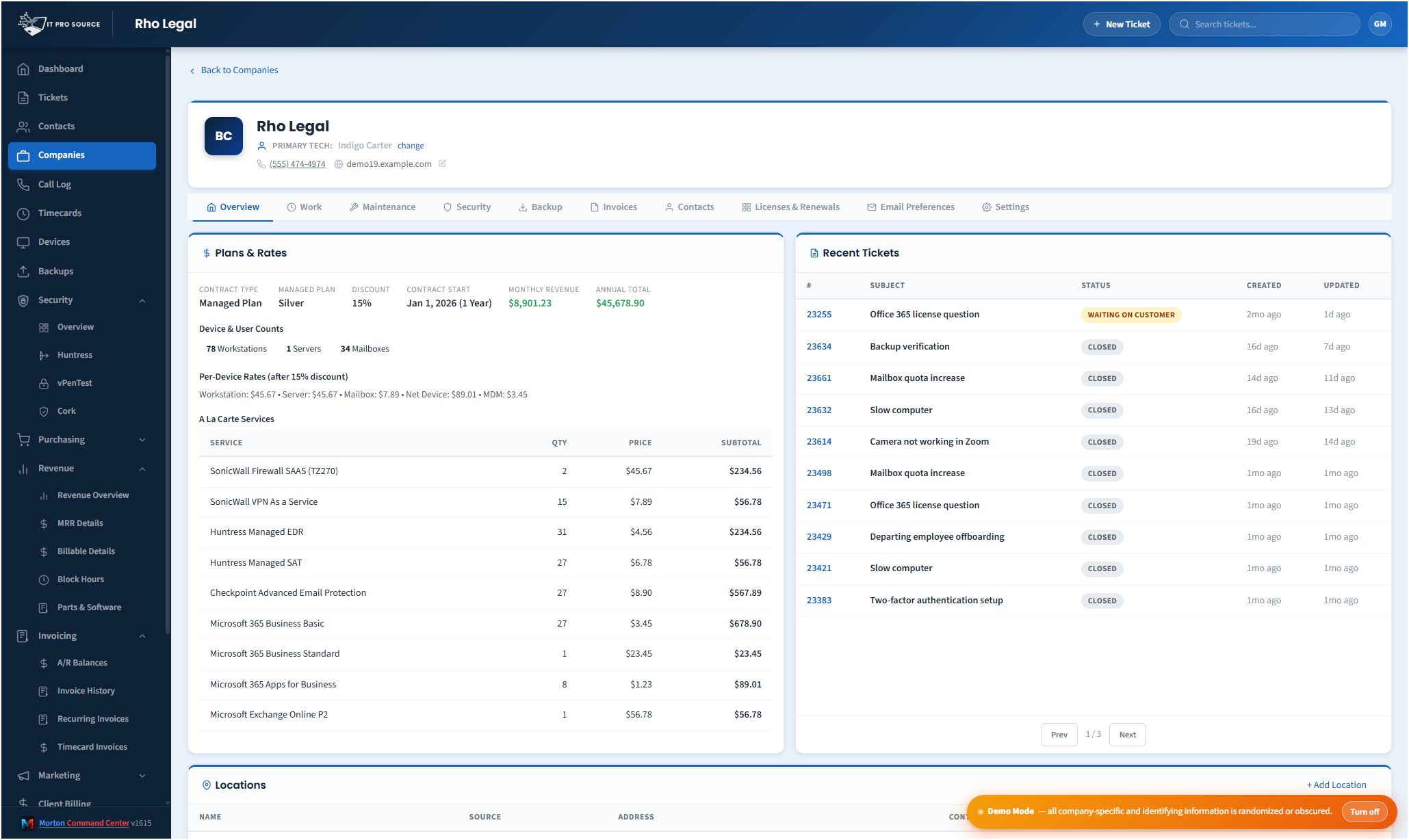
Most MSP client portals are afterthoughts: a tabbed view inside the PSA, vaguely branded, showing a thin slice of the data the customer actually wants. Customers either ignore them or complain that they have to call to get a real answer. The MSPs that take portals seriously have invested real money to build something custom, usually in the form of a $30-60K consulting engagement.
Morton Command Center includes a fully white-labeled customer portal as part of every build. Your domain, your branding, your colors, your logo, your terminology. Hosted on your subdomain (portal.yourcompany.com or similar), authenticated with email magic-link sign-in (or SSO wired during the build), and showing real, near-real-time data from the systems in your stack.
What the customer actually sees
The portal pulls from whichever RMM, PSA, backup, billing, and security tools you run. Every one of those connections is a custom integration we build for your exact stack as part of your engagement, not a pre-wired toggle you inherit. If your tool has an API, we build the integration: custom to your stack. Whatever you run (your PSA, your RMM, your security stack, or an accounting system like QuickBooks, Xero, or Sage), Morton Command works with any system: proven patterns stand up faster, and anything with an API gets built for you. That is the whole advantage over rigid all-in-one suites that force you onto their pre-built connectors. Your portal is shaped to your stack, not the other way around. Your clients see consistent data regardless of which vendors sit behind it.
- Tickets. Open tickets, status, last update, recent activity, the ability to reply, and file attachments.
- Assets at a glance. Their device and user counts (workstations, servers, mailboxes, network gear), alongside the plan that covers them.
- Backups. Backup status per protected workload, with simple traffic-light indicators (monitoring and visibility: Morton Command surfaces status, it doesn't run or restore backups).
- Security posture. A simplified view of EDR/MDR coverage, identity protection, and pen-test results, normalized from your security vendors.
- Billing. Recent invoice history and plan summary, drawn from whichever accounting system we integrate for you: QuickBooks, Xero, or any accounting tool with an API gets a custom integration built for your stack.
- Users / contacts. Who at their company is authorized (primary contact, backups, and purchase approvers), so they always know who to reach.
- Email preferences. Clients manage which reports and communications they receive directly from the portal.
The branding goes deep
This isn't "your logo in the corner of someone else's product." Every visible element (colors, typography, footer copy, transactional email templates, login screen, error pages) is yours. Customers should not be able to tell the portal is built on a third-party platform. Most can't.
The platform name "Morton Command Center" never appears anywhere customers can see. The MortonApps brand never appears. The portal is, as far as your customers experience it, your own product.
The authentication story
Customers sign in with email + magic link by default, with no password to remember, no MFA configuration burden on your support team. For larger clients, we wire SSO against their existing M365 or Google Workspace tenant during the build. Either way, the auth experience is friction-free for the end user and secure for you.
Permissions are role-based. The customer's main contact sees everything. Other authorized users see what they need (typically tickets and devices, sometimes billing). During the build we configure which data surfaces for which client role: this isn't a one-size template you adjust after the fact, it's shaped to your MSP's specific client tiers and support model. Each customer sees their own contact roster (primary contact, backups, and purchase approvers), so they always know who's authorized on their account.
Because Morton Command reads in near-real-time from your existing RMM, PSA, and billing tools (whichever vendors those happen to be), nothing migrates. Your data stays exactly where it is today, and because the platform is API-driven, any tool with an API gets a custom integration built for your stack as part of your engagement. The portal surfaces it all through your brand.
Why the portal moves the needle on retention
MSPs with strong customer portals consistently report higher retention and easier renewals. The reason: when the customer can self-serve a basic question (status of an open ticket, who they should be calling, how their backups looked last night), they don't make a support call. The interactions they do have are higher-value. The relationship feels more professional. And the QBR conversation is grounded in real data the customer has already seen, not numbers you produce on the slide deck.
The portal is the client-facing edge of a full operations platform. Everything it shows is produced by the same build your team works in: ticketing, billing and invoicing, timecards, security operations, backup monitoring, procurement and revenue analytics. That is why it never goes stale: there is no second copy to update. See the whole platform →
Pricing
Morton Command Center uses transparent flat-rate pricing. No per-seat, per-endpoint, or per-ticket fees. See current pricing on the homepage →
Launch pricing is active through December 31, 2026: sign up by then and your rate is locked in for life.
Ready to hand your clients a portal with your name on it?
The first call is a 30-minute discovery: we map which sections each client tier should see, which of your tools feed them, and where the portal should live. No commitment, no sales pressure.
Questions first? Email [email protected] or read the FAQ.
Related solutions
Morton Command Center is built around your specific stack. If this page resonates, these adjacent angles probably will too:
- Consolidate Your MSP Stack: how portal data comes from the unified layer.
- Custom MSP Platform: why every build includes the portal.
- MSP Security Operations: what the security view shows clients.
- Automated MSP Invoicing: where invoice data on the portal originates.
- Customer Portal: the feature page: what the customer portal actually does, in detail.
- MSP Email Marketing: the push side of client communication.
Further reading
- Give clients a portal without exposing your admin tools: the scoping rules that keep a portal safe to hand out.
- A repeatable client-onboarding workflow for MSPs: where the portal fits in the handoff from sales.