A two-day billing grind, now a one-hour review.

Morton Command Center was built and battle-tested inside a working MSP before it was ever offered to anyone else. IT Pro Source — a California managed service provider running 60+ client organizations and more than 1,200 devices — used it to turn month-end billing from a two-day manual grind into a roughly one-hour review, and to pull eleven separate tools into one branded screen.

No data migration. No rip-and-replace. Ticketing, accounting, time tracking, licensing, security, backups, and phones stayed exactly where they were — unified into one workspace instead of scattered across eleven browser tabs. The platform has run in daily production at IT Pro Source for over six months.

2 days → ~1 hr
Month-end billing, start to finish
60+
Client organizations supported
1,200+
Managed devices in one view
The challenge

Eleven tools, eleven tabs, and a tax on every ticket

Like most modern MSPs, IT Pro Source had assembled a best-of-breed stack — a different specialist tool for each job. RMM in one place. Ticketing in another. Time tracking, accounting, distributor licensing, security, compliance, backups, and phones each lived in their own portal, with their own login and their own way of naming the same customer.

Individually, every tool was good at its job. Together, they created friction. Handling a single ticket could mean jumping between the RMM to check a device, the PSA to log the work, the phone system to see the call, and the time tracker to record the hours — the same customer, described four different ways across four screens.

The cost showed up most painfully at month-end. Billing meant pulling device counts from the RMM, reconciling distributor license usage by hand, gathering time entries, applying contract rules and after-hours multipliers, and re-keying all of it into accounting. Start to finish, it swallowed the better part of two days every month — a slow, error-prone grind where small misses quietly added up to lost revenue.

The obvious fixes were both bad. Migrating everything into a single all-in-one PSA suite meant abandoning tools the team liked and trusted, and moving years of history into someone else's database. Building a custom internal platform from scratch meant a development project no busy MSP has time to own. Neither option respected the stack that already worked.
The approach

Build on top of the stack — don't replace it

Morton Command Center took a different path: read from the tools IT Pro Source already ran, over their APIs, and stitch them into one personalized workspace. Nothing was migrated. Each system stayed the system of record for its own data — Morton Command became the single screen that pulled it all together and added the workflows the team was missing.

The platform connected across the categories that make up the IT Pro Source stack:

  • RMM — device health, alerts, and patch status (NinjaOne)
  • Ticketing / PSA — the help-desk queue and customer history (Freshdesk)
  • Accounting — invoicing into on-premises QuickBooks Desktop, bridged securely by the Conductor local sync agent
  • Time tracking — billable hours and after-hours rules (eBillity)
  • Distributor licensing — Microsoft 365 and cloud subscription counts (Pax8)
  • Security & compliance — managed EDR and posture (Huntress, Cork)
  • Backup & continuity — backup health and reporting unified across every system into one place (Veeam, Datto, NinjaOne)
  • Phones — call queues, on-call rotation, and call logs (3CX)

Those are the tools IT Pro Source happens to run — not a required list. Morton Command Center is built around vendor-agnostic adapters, so the same workspace works on whatever stack an MSP already has. Run Atera instead of NinjaOne, ConnectWise or HaloPSA instead of Freshdesk, Xero or Sage instead of QuickBooks? If the tool exposes an API, the connection gets built to fit. Each integration is custom-built per customer as part of the engagement.

Inside the workspace

Billing that builds itself — and the whole stack on one screen

At month-end, every client's invoice is assembled and waiting for review. Day to day, the team opens one dashboard instead of eight portals — tickets, devices, revenue, and security surfaced together, in their own branding.

cc.yourmsp.com
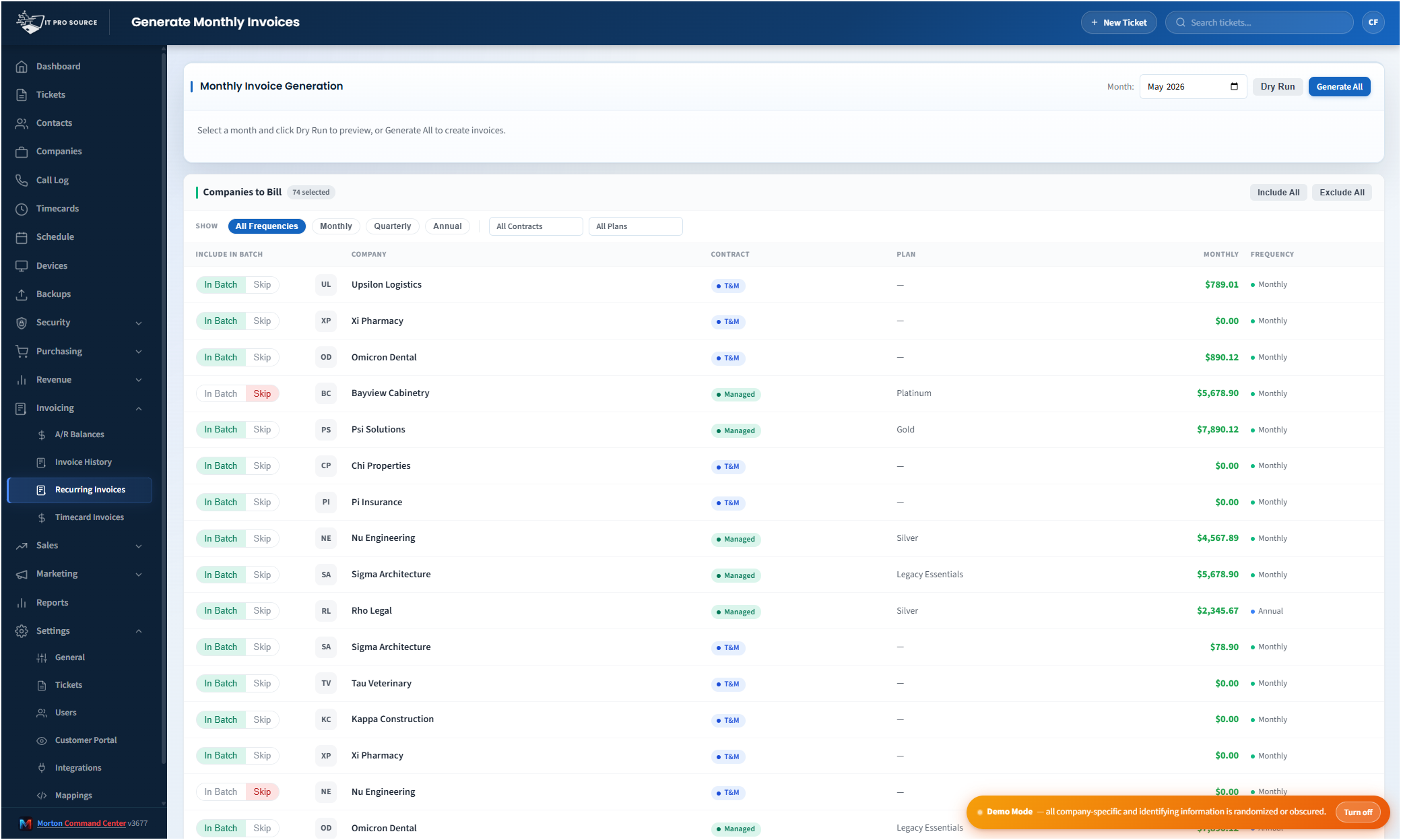
Automated month-end invoice generation in Morton Command Center — every client's invoice pre-populated with line items, quantities, and totals, ready to review before posting to QuickBooks
Month-end as a review queue: each client's invoice arrives pre-built with the right line items, quantities, and rates — scan, adjust, approve, post.
cc.yourmsp.com
The unified Morton Command Center dashboard — tickets, devices, security, and billing from across the whole stack on one screen
The single pane: open items, device health, and the day's activity pulled from every connected tool into one view.
What changed

Billing in hours instead of days — and a lot less tab-switching

The biggest single win was billing. But once the stack was unified, the day-to-day friction that used to surround every ticket started to fall away too. The workflows IT Pro Source now runs inside Morton Command Center:

Month-end billing went from two days to about one hour

This is the change that mattered most. Morton Command Center pulls current device counts, license usage, backup seats, time entries, and project work from across the stack, applies each client's plan and contract rules — after-hours multipliers included — and assembles every invoice ready to inspect, then posts approved invoices straight into QuickBooks Desktop. A run that used to eat the better part of two days every month now takes about an hour of review and approval. The same reconciliation surfaces charges that manual billing used to miss.

Client email marketing runs from the same workspace

IT Pro Source runs its client email marketing — campaigns and newsletters — directly inside Morton Command Center, off the same unified customer and contact data that powers everything else. There's no separate email platform to maintain and no exporting contact lists between systems: the audience is already there, current, and tied to the live client records.

Distributor licensing reconciled itself

Pax8 license counts are matched against what clients are actually billed, so seat changes stop slipping through the cracks between the distributor portal and the invoice.

Every backup, reported in one place

Backups used to mean three separate consoles — Veeam, Datto, and NinjaOne — each with its own login and its own idea of what a healthy backup looks like. Morton Command Center pulls status and reporting from all three into a single view, so the whole fleet's protection is visible at a glance and every client's backup report comes from one place instead of three. Nothing quietly fails unnoticed in a portal no one remembered to check.

The phones joined the picture

Call queues, the weekly on-call rotation, and call logs surface alongside tickets and devices — so a customer's calls, work, and history sit on the same screen instead of in a separate phone portal.

One name per customer, everywhere

Morton Command Center maps each customer across every connected tool, so a client looks like one company — not four differently-spelled records — no matter which underlying system the data came from.

"We built Morton Command Center because we were living the problem ourselves — eleven tools, none of them talking, and a billing process that ate days every month. Running it inside IT Pro Source first means every feature had to survive real clients and a real month-end before anyone else ever saw it."
— Greg Morton, founder of Morton Command Center and partner at IT Pro Source

That origin is the difference. Morton Command Center isn't a product designed in a vacuum and demoed against a sandbox — it's the operations layer a working MSP built for itself, hardened against 60+ live clients before it was ever offered to the market.

By the numbers

The pilot, at a glance

  • Month-end billing: ~2 days → ~1 hour — and still trending down
  • 60+ client organizations supported from one workspace
  • 1,200+ managed devices surfaced in a single view
  • 11 tools unified — RMM, PSA, accounting, time, licensing, security, compliance, backup, and phones
  • Every backup in one report — Veeam, Datto, and NinjaOne status and reporting unified
  • 6+ months in continuous daily production
  • Zero data migrations — every tool stayed the system of record

Built for your MSP next

IT Pro Source proved the model: unify the stack you already run, keep every tool in place, and get one screen plus the workflows that were missing. Because Morton Command is shaped to each customer's tools and billing rules, your build starts from your stack — not a generic template you bend yourself around.

Morton Command Center uses transparent flat-rate pricing — no per-seat, per-client, or per-invoice fees. See current pricing on the homepage → The Founding Five program is active — the first five customers lock in their rate for the lifetime of their account.

Related reading

See what this would look like for your stack

We'll map your current tools, your contracts, and your billing process, then show you the single-screen workspace your MSP could run on — built on the stack you already have.

Schedule a Consultation

Questions first? Email [email protected] or read the FAQ.