Stop losing two days every month to MSP invoicing.

Morton Command Center builds your invoices automatically — pulling device counts, license usage, time entries, project work, backup seats, and add-ons from the tools you already use. Instead of chasing spreadsheets and hoping nothing was missed, your team gets a clean review queue with every customer invoice already prepared.

Review. Adjust if needed. Push straight to QuickBooks. Month-end billing goes from a painful manual process to a fast approval workflow.

Days → hours
Month-end invoicing workflow
Data → billable lines
Counts and usage converted automatically
Approval → QuickBooks
Human review before anything is sent
The complete picture

Every kind of invoice, automated

Recurring contracts are just the start. Morton Command Center handles the entire invoicing workflow — monthly managed services, billable time, and one-off parts — so nothing has to be rebuilt by hand.

Automatic recurring invoices

Your monthly managed-services billing builds itself. Morton Command Center pulls current device counts, license usage, backup seats, and add-ons from your stack — synced automatically from your tools before billing runs, so quantities are always up to date — applies each client's plan and contract, and assembles every recurring invoice with quantities already populated — ready to review and push. No spreadsheets, no manual counting.

Automatic time-card invoices

Billable hours become invoice lines on their own. Time entries flow in from your PSA or time-tracking tool, match to the right client, project, and rate — after-hours multipliers included — so project and T&M work is invoiced accurately without re-keying a single entry.

On-demand parts invoices

Need to bill for hardware, licenses, or a one-off purchase? Generate a clean parts invoice in seconds — add line items, quantities, and pricing, then push it straight to your accounting system. No waiting for the month-end run.

Feature spotlight

Recurring invoices, up close

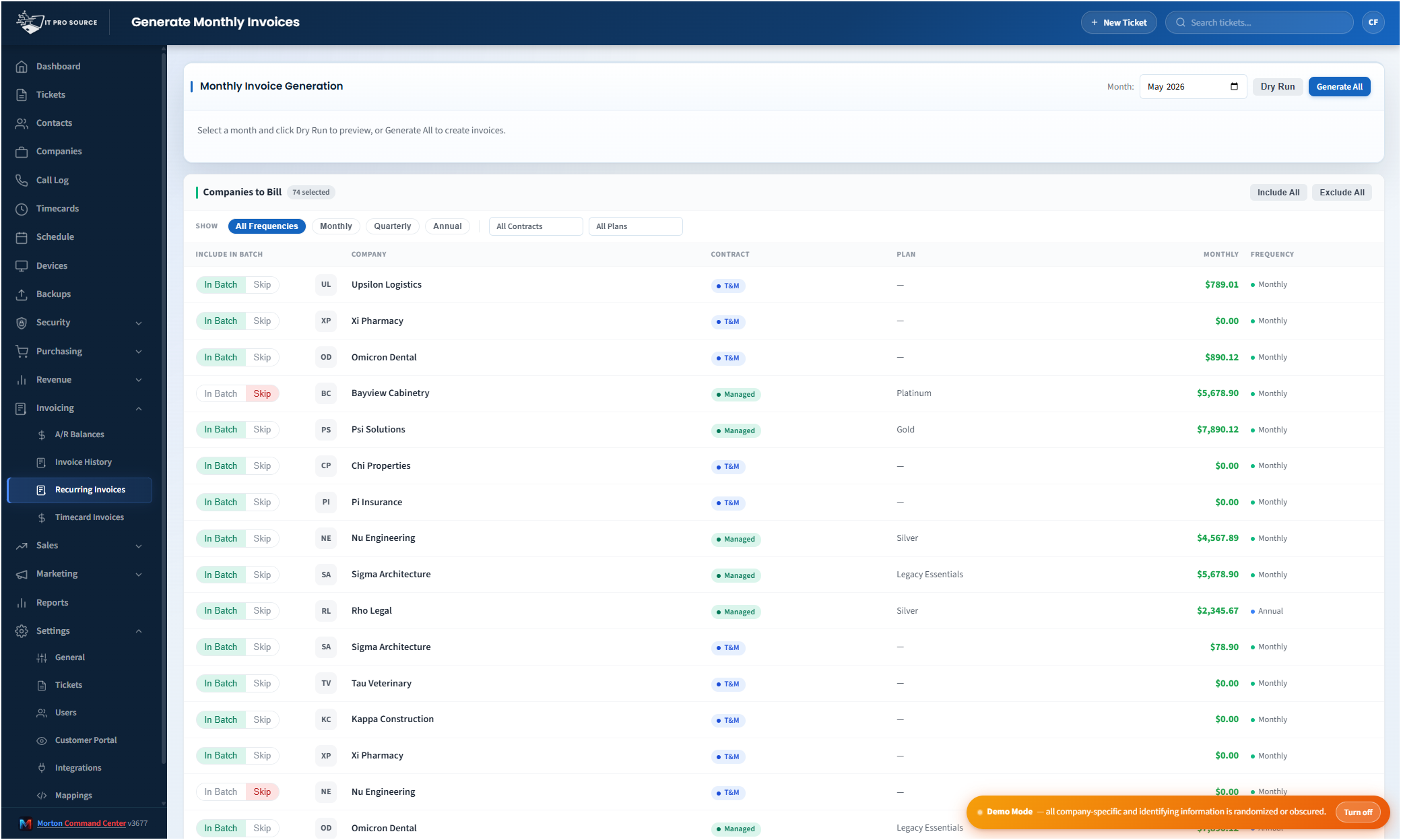
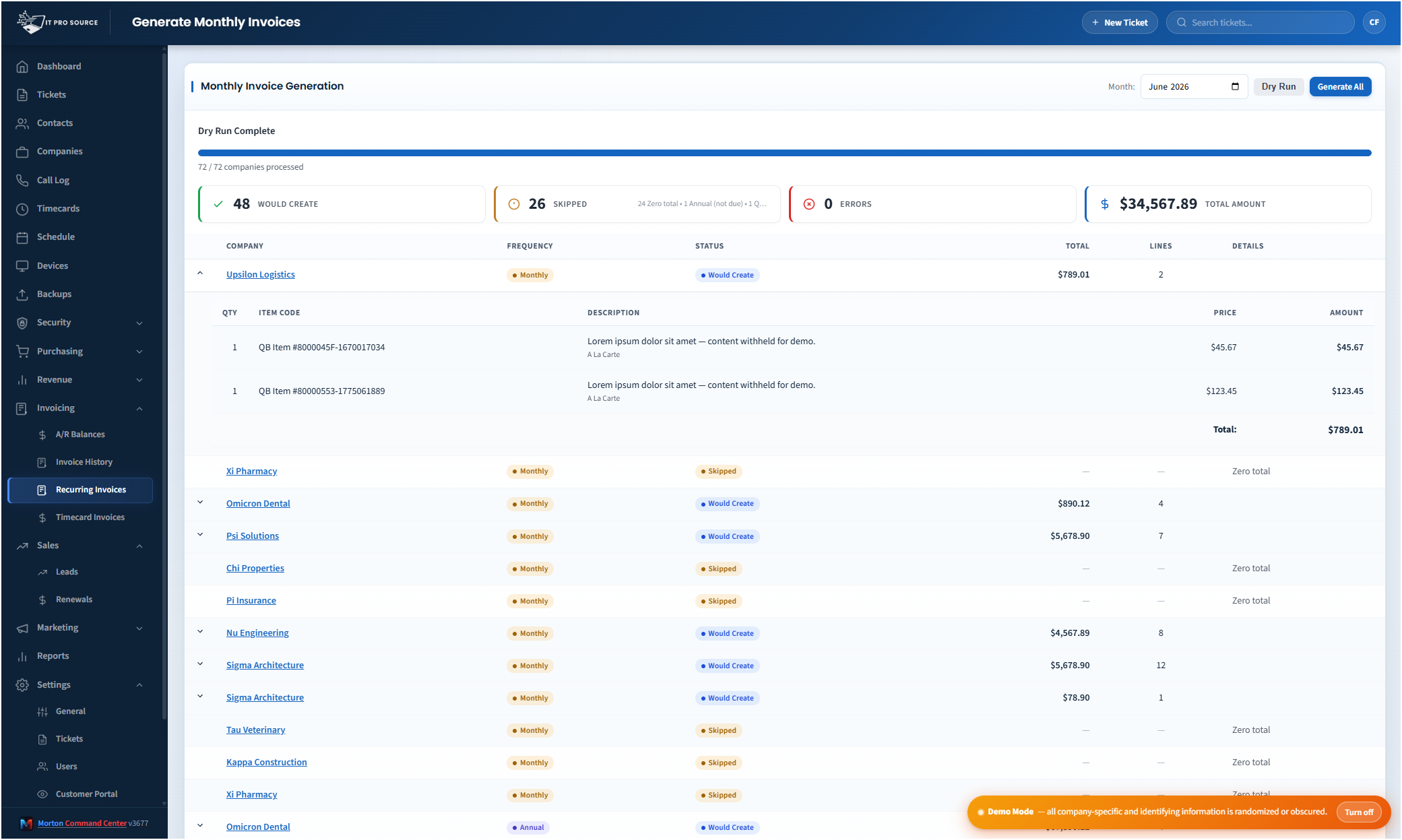
Here's the recurring-billing workflow in action — from every client's configured plan to a full invoice run, generated and ready to review before anything is sent.

See it in action
cc.yourmsp.com
Monthly invoice generation in Morton Command Center — every client listed with their plan, contract type, monthly rate, and billing frequency configured in one place
Sample layout
Every client and their billing setup in one place — plan, contract type, rate, and billing frequency, all configured inside Morton Command Center.
cc.yourmsp.com
Invoice generation dry run in Morton Command Center — invoices ready to create with line items, quantities, and totals pre-populated for review before pushing to QuickBooks
Sample layout
Every client's invoice is pre-populated with the right line items, quantities, and rates. Scan the queue, fix anything that looks off, and push to QuickBooks.

Month-end invoicing is one of the most frustrating, time-consuming jobs inside an MSP.

You have to pull device counts from your RMM. Match license usage against your distributor — Pax8, Ingram, or whoever you buy through. Review time entries. Check project hours. Apply the right contract rules. Update quantities. Account for mid-month changes. Then push everything into your accounting system and hope nothing was missed.

Morton Command Center automates the busywork.

It gathers the billing data from your existing stack, applies your pricing rules, builds the invoice lines, flags anything unusual, and gives your bookkeeper a clean review queue before anything goes out to a customer.

You stay in control. The platform does the tedious part.

Out-of-the-box polish, custom-built fit

You don't have to choose between a rigid all-in-one suite that dictates how you invoice and an expensive from-scratch development project. Morton Command Center sits in between: a mature platform core shaped to your billing rules, your tiers, and your stack. The invoicing logic is configured for how your MSP actually bills — not a generic template you bend yourself around — while the tools you already use stay exactly where they are.

Your RMM, your PSA, your accounting system — none of them move. Morton Command Center reads from the tools you already run and pushes approved invoices back into them. No data migration, no rip-and-replace.

Everything that normally slows invoicing down gets handled automatically

Morton Command Center can pull together the moving pieces that usually make MSP billing painful:

  • Devices from your RMM
  • Users and mailboxes from Microsoft 365, Google Workspace, or your identity provider
  • License counts from Pax8, Ingram, or your distributor
  • Backup seat counts from Veeam, Datto, Acronis, Barracuda, or similar tools
  • Time entries from your PSA or time-tracking system
  • Project hours, milestones, and overflow work
  • After-hours billing multipliers
  • Tiered pricing rules
  • Monthly add-ons and one-off charges
  • Mid-month changes that need review

Instead of rebuilding invoices by hand, your team starts with invoices that are already populated, calculated, and ready to inspect.

Your bookkeeper reviews invoices instead of building them

At month-end, Morton Command Center creates a review queue for every customer invoice.

Each invoice is pre-filled with the right line items, quantities, rates, and totals based on your rules. Your team can scan the invoice, make edits, review flagged changes, and approve the final version before pushing it into QuickBooks.

Nothing gets sent blindly. You still control the final invoice.

But the repetitive work — the copying, checking, counting, matching, updating, and re-entering — is handled for you.

Save time and recover revenue you may already be missing

The time savings are obvious: invoicing that used to take days can become a short review-and-approval process.

But the bigger win is often revenue recovery.

Manual MSP billing leaks money. Devices get added but not billed. License changes don't make it onto the invoice. Time entries get missed. Backup seats drift. Project work gets forgotten. Small errors add up every single month.

Morton Command Center helps catch those gaps automatically by reconciling what your tools say against what your customers should be billed for.

That means fewer missed charges, fewer invoice mistakes, and less month-end stress.

Automation without losing control

Morton Command Center does not blindly send invoices to your customers.

  • It prepares the invoice.
  • It applies the rules.
  • It flags the edge cases.
  • It pushes approved invoices into your accounting system.

Your team still makes the final decision.

That means you get the speed of automation without giving up the judgment and customer awareness that good MSP billing still requires.

Push to the accounting system you already run

Your accounting integration is custom-built for your stack as part of your engagement — so approved invoices post straight into the books you already keep, no re-keying. If you run QuickBooks Desktop (Enterprise, Premier, and Pro), the connection uses Conductor, a lightweight local sync agent that bridges on-premises QuickBooks to the cloud without ever exposing it to the internet — built to fit you, with your books staying exactly where they are. Nothing migrates.

Run a different accounting system? That's the advantage of a vendor-agnostic adapter pattern: instead of forcing you onto a rigid suite's pre-canned integrations, we build the connection to fit your exact stack. If your accounting tool exposes an API, the same approve-then-post workflow gets wired to it, custom to you. Accounting systems we build connections for include:

  • QuickBooks Online
  • Xero
  • Sage — Intacct and Business Cloud Accounting
  • NetSuite and other Oracle ERP suites
  • Microsoft Dynamics 365 Business Central
  • FreshBooks, Zoho Books, and Wave
  • Bill.com and other AP/AR automation platforms

Because the platform is built around adapters rather than a single hardcoded vendor, the list above isn't a boundary — regional accounting packages, vertical-specific billing systems, even an in-house ledger can be scoped into your build. We'll confirm exactly what your accounting software's API supports during onboarding, then build the connection to fit.

Manual entry vs. PSA-native billing vs. Morton Command

Three ways MSPs handle month-end invoicing today, side by side:

  Manual entry into QuickBooks PSA-native billing module Morton Command
Setup timeNone — but every month costs the sameWeeks of configuration, often tied to a PSA migration2-4 weeks, no migration
Per-seat feesNo — just labor costUsually yes, bundled into the PSA's per-tech pricingNo — flat rate regardless of headcount
License/device-count accuracyManual counting — error-prone, drifts monthlyAccurate only for the PSA's own ecosystemSynced live from your RMM and distributor before every run
Migration requiredNoYes — billing data has to live inside the PSANo — reads your existing tools in place

QuickBooks is used above as the example because it's the accounting system most MSPs already run — the same approve-then-post workflow gets built the same way for Xero, Sage, NetSuite, or any accounting system that exposes an API. If your tool has an API, we build the integration for it.

Pricing

Morton Command Center uses transparent flat-rate pricing — no per-seat, per-client, or per-invoice fees. Whether you bill 10 clients or 100, your monthly cost is the same: a one-time $5,500 custom build (3 integrations included), then $350/mo for hosting and support. See full pricing details on the homepage →

Founding Five program is active — the first five customers lock in their rate for the lifetime of their account. See current pricing on the homepage →

Related solutions

Morton Command Center is built around your specific stack. If this page resonates, these adjacent angles probably will too:

Frequently asked questions

How does automated MSP invoicing work? +
Morton Command Center pulls device counts, license usage, backup seat counts, and time entries from the tools you already run, applies your contract and pricing rules, and builds each customer invoice automatically. Your team reviews the pre-built invoice queue, adjusts anything flagged, and approves before it posts to your accounting system — nothing goes out to a customer without human review.
Does it work with QuickBooks Desktop? +
Yes. We build a custom QuickBooks Desktop integration for you via Conductor, a secure local sync agent, alongside QuickBooks Online, Xero, Sage, NetSuite, and any other accounting system that exposes an API. QuickBooks is used as the example here because it's the most common accounting system among MSPs, not because it's the only one supported — if your accounting tool has an API, we build the connection to it.
Does automated invoicing replace my bookkeeper? +
No. Morton Command prepares each invoice, applies your rules, and flags anything unusual, but your team still reviews and approves every invoice before it's pushed to your accounting system. Automation removes the manual data-gathering and re-keying work — not the human judgment call.

Ready to stop rebuilding invoices by hand?

If your MSP is still spending hours — or days — every month collecting billing data, updating invoice lines, and checking for missed charges, Morton Command Center was built for you.

We'll map your current tools, your contracts, your billing process, and your edge cases. Then we'll show you what an automated invoicing workflow could look like for your MSP.

One 30-minute call could save your team days every month.

Schedule a Consultation

Questions first? Email [email protected] or read the FAQ.