Email your clients from the same place you already run the MSP.

Morton Command Center sends campaigns, newsletters, and announcements to the contacts already synced from your ticketing system — no separate marketing tool, no exporting CSVs, no re-keying a contact list that's stale the moment you save it.

Your contacts are right there. Compose, send, and track from inside the same platform your techs and bookkeeper already live in. Branded with your logo and colors, delivered through your own sending domain.

One contact list
Synced from the tools you already run
Flat rate
No per-contact or per-send pricing
Your brand
Your logo, colors, and sending domain
Built in, not bolted on

Client communication, where the data lives

Most MSPs run a standalone email marketing tool that knows nothing about their clients. Morton Command Center sends from the same contact directory your team already works in — kept current by the systems you already run.

One contact list, already synced

Your recipients are the same contacts your team works tickets against. Morton Command Center reads contacts from whichever system owns them — your PSA or RMM (we build that integration to your stack, whether it's Freshdesk, NinjaOne, or anything else), or its own native directory — so when a contact changes there, your campaign list reflects it. Because the platform is API-driven, any system with an API gets a custom integration built the same way. No exporting, no importing, no second copy of your client roster going stale in a marketing app.

Branded campaigns and newsletters

Send announcements, maintenance notices, and client newsletters that carry your logo, your colors, and your sending domain. Every outbound message runs through one branded template wrapper, so a campaign looks exactly like the rest of your client communications — not like a generic blast from a tool nobody recognizes.

Send log and delivery records

Every campaign you send is recorded. Morton Command Center keeps an email send log and an inbound log so you can see what went out, to whom, and when — all in the same console as your tickets, invoices, and reporting. One place to look instead of logging into yet another dashboard.

Feature spotlight

Email campaigns, up close

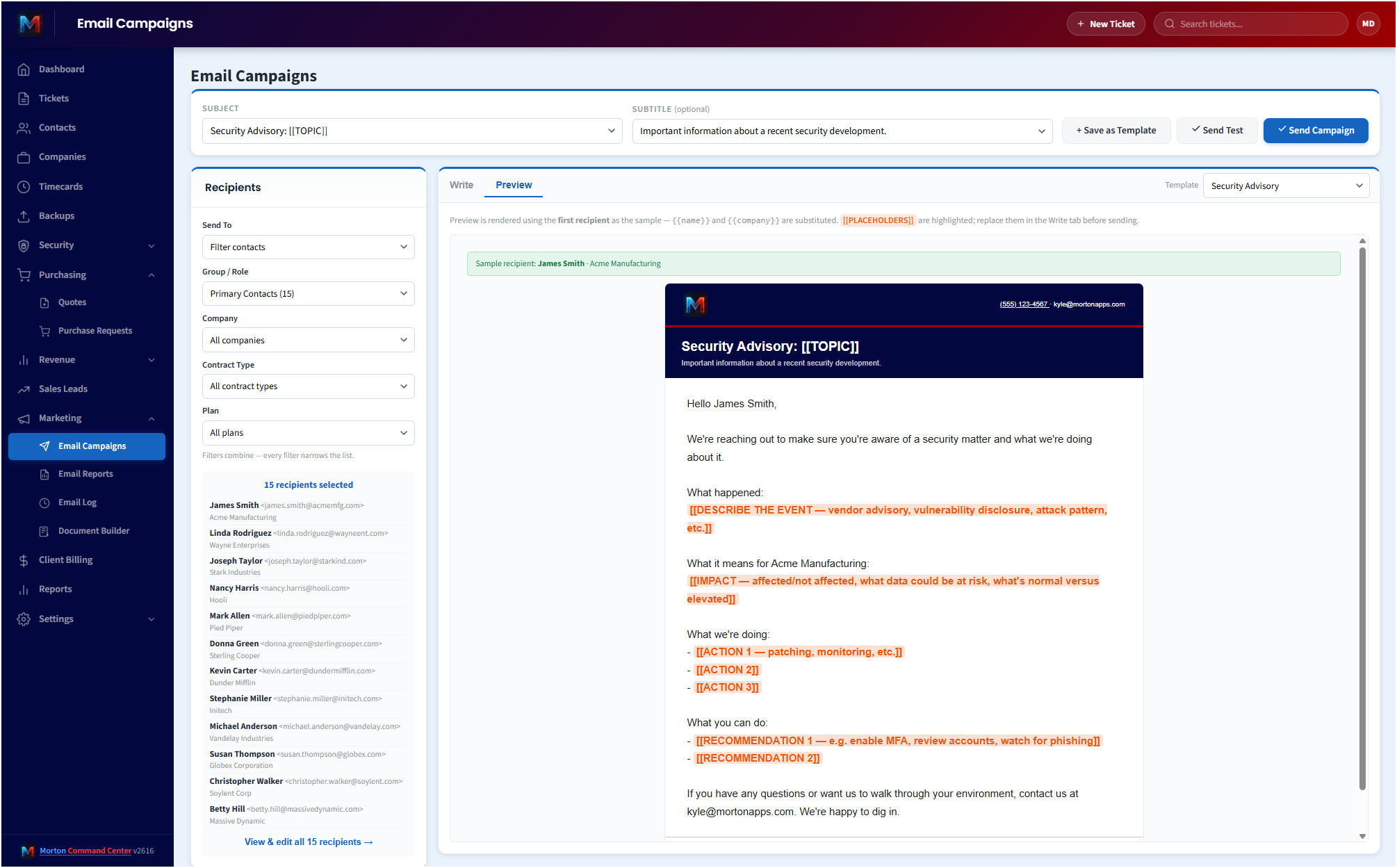
Here's the email marketing surface inside the platform — compose a branded campaign, pick recipients from your synced contacts, and send through your own domain.

See it in action
cc.yourmsp.com
Email marketing in Morton Command Center — composing a branded client campaign with recipients drawn from the contacts already synced from the MSP's ticketing system, sent through the MSP's own domain
Sample layout
The Email Campaigns view, where you compose a branded message, choose recipients from your already-synced contacts, and send it through your own domain — all without leaving Morton Command Center.

Most MSPs end up paying for an email marketing platform that has no idea who their clients are.

You keep your real contact data in your ticketing system. Then, to send a quarterly newsletter or a maintenance-window announcement, you export a list, clean it up, import it into a separate marketing tool, and pay that tool by the contact. A month later the list is already wrong — a primary contact changed, a client offboarded, three new sites came online — and you do it all again.

Morton Command Center removes the separate tool entirely.

Client email lives in the same platform as your tickets, your contacts, your invoices, and your reporting. The recipients are the contacts you already work with every day. There's nothing to export and nothing extra to keep in sync.

Your recipients are your real contacts

This is the part that makes built-in email different from a bolted-on marketing app. Morton Command Center reads your contact directory from whichever system owns it — your PSA or RMM (we build that integration custom to your stack, whether it's Freshdesk, NinjaOne, or whatever you run), or the platform's own native contact store — and that same directory is what you send campaigns against. If your tool has an API, we build the integration for it.

So when a client's contact details change in your ticketing system, the change shows up where it matters. You're not maintaining a second roster in a marketing tool that drifts out of date the moment you finish importing it. One source of truth for who your clients are, used for support and for outbound email alike.

Because contacts carry roles — primary, backup, billing — you can be deliberate about who hears what, instead of blasting one undifferentiated list every time.

Campaigns that actually look like they came from you

Every email Morton Command Center sends — campaigns, newsletters, and announcements alike — runs through a single branded template wrapper. That means your logo, your colors, and your company name, applied consistently to everything that goes out.

Delivery runs on a sending service provisioned for your tenant, using your own sending domain. Clients see mail that's plainly from your MSP, not from a third-party marketing platform's shared infrastructure. It's the same branding that carries across your client portal and your automated reports, so the whole client-facing experience holds together.

What this module is, stated plainly: list-based branded sends to your contacts, plus a record of what went out. It is genuinely useful for newsletters, service announcements, maintenance notices, and periodic client outreach. It is not a drip-sequence or journey-automation engine, and we're not going to pretend otherwise — if your story is "send good, on-brand email to the clients I already have, without paying a per-contact tax," this is exactly that.

Drop the per-contact bill, not just the extra tab

Standalone email marketing tools almost all price the same way: the more contacts you load, the more you pay. For an MSP whose contact count grows with every client and every new site, that's a bill that quietly climbs forever — for a tool you might use a handful of times a quarter.

Morton Command Center folds client email into the platform you're already paying a flat rate for. Sending to 200 contacts costs the same as sending to 2,000, because email isn't a separate metered product here — it's one more thing the operations platform does.

The second win is the one you feel every day: one fewer login, one fewer subscription to renew, one fewer place where your contact data has to be kept current by hand. Consolidating the per-contact marketing tool into your operations platform is exactly the kind of stack-trimming that adds up across a year.

Reporting and scheduled emails, in the same place

Beyond hand-composed campaigns, Morton Command Center can send scheduled, automated reports to clients on a recurring basis — ticket summaries, maintenance recaps, backup status, security posture, and billable-work rollups — with per-company opt-out respected. Those reports go out through the same branded delivery as your campaigns, so a client's inbox sees one consistent voice from your MSP.

And everything is logged. The email send log and inbound log live right alongside your tickets and invoices, so when someone asks "did the maintenance notice go out?" the answer is one screen away, not buried in a separate vendor's portal.

No rip-and-replace — it sits on top of what you run

The contact directory powering your email comes from your existing ticketing system — your PSA, RMM, or support tool, whatever you run. Morton Command Center reads through normalized adapters we build custom to your stack. If your tool has an API, we build the integration for it — every integration is custom-built to your stack, alongside the platform's own native contacts. Your tools don't move and nothing is migrated.

One honest note on contact sync: the Microsoft 365 directory is read by the platform, and a contact-sync run writes results into your ticketing-vendor contacts — it does not write back into Microsoft 365. Your authoritative contact source stays exactly where it is. The point of this module isn't to take over contact management; it's to let you email the contacts you already keep, without standing up a separate marketing tool to do it.

Pricing

Morton Command Center uses transparent flat-rate pricing — no per-seat, per-client, or per-invoice fees, and no per-contact email tax. Whether you email 100 contacts or 5,000, your monthly cost is the same. See current pricing on the homepage →

Founding Five program is active — the first five customers lock in their rate for the lifetime of their account. See current pricing on the homepage →

Related solutions

Morton Command Center is built around your specific stack. If client communication on a unified platform resonates, these adjacent angles probably will too:

Ready to email clients without a second tool?

If you're paying a per-contact marketing platform to send a few client emails a quarter — and re-importing your contact list every time it goes stale — Morton Command Center was built to make that a non-problem.

We'll map your contact sources, your branding, and the kinds of client emails you actually send. Then we'll show you what sending campaigns and newsletters from inside your operations platform looks like for your MSP.

One 30-minute call could retire a subscription and a stale spreadsheet at the same time.

Schedule a Consultation

Questions first? Email [email protected] or read the FAQ.