Track every lead in the same place you run the MSP.

Morton Command Center gives you a simple, visual sales pipeline that lives right beside your tickets, billing, security, and devices. Capture a new prospect, move them through clear stages, log every call and email, and watch your open-pipeline value update — without jumping out to a separate CRM tab.

When a deal is won, convert it into a real company record in one step — so the prospect you closed this morning is the client you support this afternoon, with no re-typing and no copy-paste between tools.

5 stages
New, In Progress, Won, Lost, Rejected
Lead → company
One-step conversion on a won deal
One login
Sales next to ops, not in a silo
Sales, in your ops platform

A pipeline that's actually next to the work

Most MSPs run sales in a disconnected tool nobody opens. Morton Command Center keeps lead tracking in the same dashboard as everything else — visual, lightweight, and built around how a small sales team actually moves deals.

A clear five-stage board

Every lead lands on a visual board and moves through New, In Progress, Won, Lost, and Rejected. Drag a card forward as the deal advances, and the column headers and pipeline totals reflect exactly where your prospects stand — no spreadsheet gymnastics, no guessing what's still alive.

Log the whole conversation

Each lead keeps its own activity trail. Record notes, calls, emails, meetings, and tasks against a prospect so the next person to touch the deal sees the full history — what was promised, what's outstanding, and when you last reached out — instead of digging through inboxes.

Win it, then onboard it

Closing a deal shouldn't mean re-entering the same details somewhere else. Mark a lead won and convert it straight into a real company record inside Morton Command Center — so the account flows directly into the rest of your operations without a hand-off gap.

Feature spotlight

Your sales board, up close

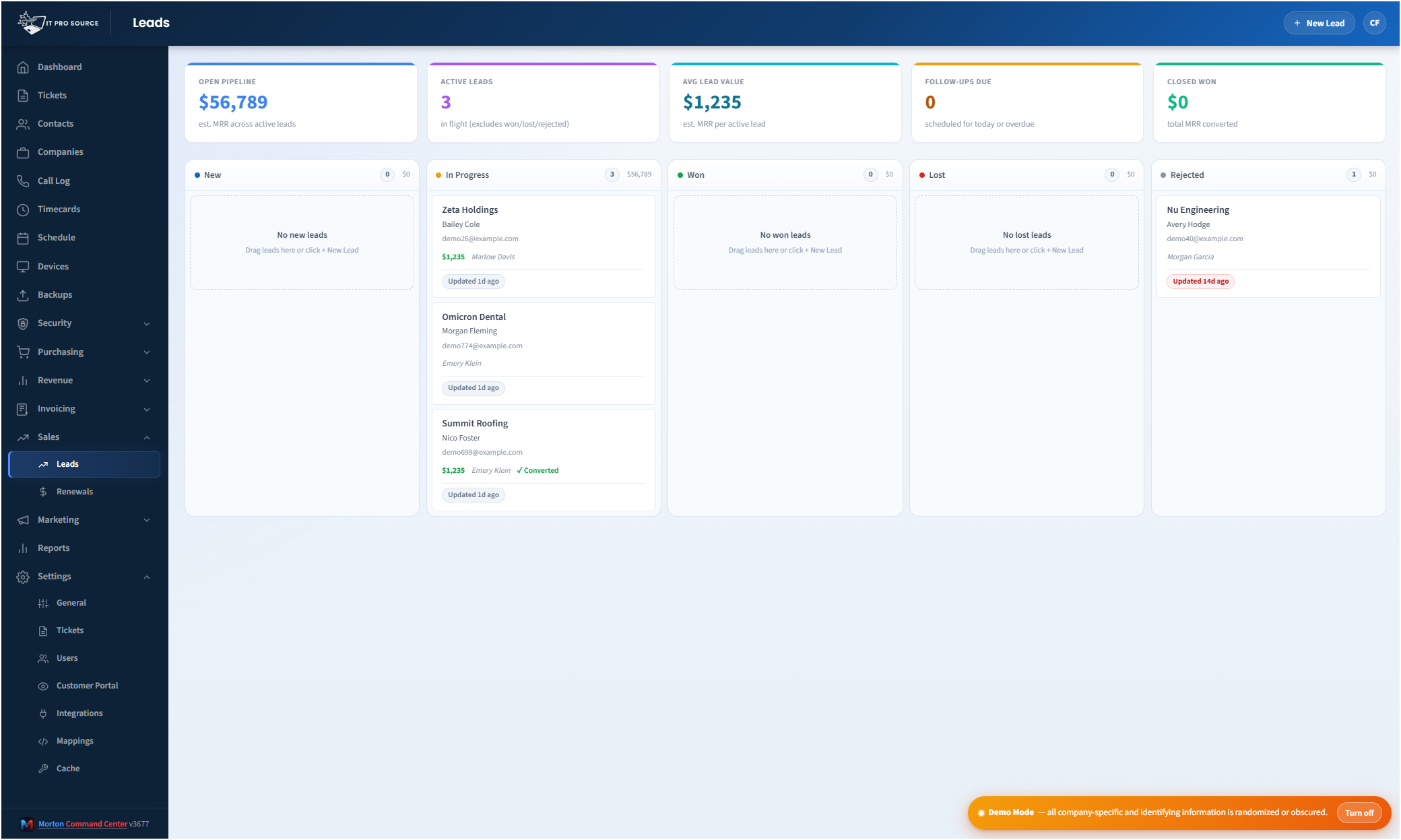
Here's the Leads view: open-pipeline value and active-deal counts across the top, with every prospect sorted into its stage column below — all inside the same platform you use to run support, billing, and security.

See it in action
cc.yourmsp.com
The Leads pipeline in Morton Command Center — summary cards showing open pipeline value, active lead count, and won value across the top, with a kanban board of New, In Progress, Won, Lost, and Rejected stage columns holding individual lead cards below
Sample layout
The Leads board: pipeline-value and active-deal summary cards up top, with each prospect placed in its stage column — New through Rejected — so the whole sales picture reads at a glance.

Most MSPs are good at the work and bad at tracking the deals that create it.

New prospects live in someone's inbox. Quotes sit in a folder. Follow-ups depend on whoever remembers. And the one CRM you paid for stays closed because logging into yet another tool — disconnected from tickets, billing, and the actual client list — never feels worth it.

Morton Command Center puts your pipeline where you already are.

Sales is a module inside the same platform that runs your support desk, your invoicing, your device monitoring, and your security rollup. One login. One client list. No swivel-chairing between a sales tool and an operations tool that don't know about each other.

Built to be used, not abandoned

The pipeline in Morton Command Center is deliberately lightweight. It's a focused lead-tracking board, not a sprawling sales-automation suite you'll spend a quarter configuring. That's the point: a tool a small MSP sales effort will actually open every day beats a heavyweight CRM that sits empty.

You capture a lead, you watch it move, and you keep the context attached to it. When it's time to grow the feature, the platform grows with you — but you start with something simple enough to adopt on day one.

Move deals through stages everyone can read

The board uses five clear stages, so anyone glancing at it knows the state of the pipeline:

  • New — a fresh prospect that hasn't been worked yet.
  • In Progress — an active deal you're qualifying, quoting, or following up on.
  • Won — closed business, ready to become a client.
  • Lost — a deal that didn't close, kept for the record.
  • Rejected — a lead that wasn't a fit, set aside without clutter.

Each card carries the prospect's details and deal value, and the summary cards across the top of the Leads view roll those numbers into an open-pipeline figure, an active-lead count, and won value — so you can see momentum without building a single report.

Every touchpoint, attached to the lead

A deal is more than a name and a dollar figure — it's a conversation. Morton Command Center lets you log activities against each lead so the history travels with it.

Record a note after a discovery call. Mark that you sent an email. Schedule a follow-up task. Log the meeting you just had. The next time anyone opens that lead — including future-you, three weeks later — the full thread is right there. No reconstructing what happened from memory, no losing a warm prospect to a forgotten follow-up.

From won deal to supported client, in one move

The handoff from sales to operations is where most MSPs spring a leak. The deal closes, and now someone has to re-create the customer in the PSA, set up the company record, and copy over everything that was already captured during the sale.

In Morton Command Center, a won lead converts directly into a real company record. The prospect you've been nurturing becomes a live account in the same platform, ready to take tickets, get billed, and show up on your dashboards — without a second round of data entry.

That tight loop is the whole advantage of running sales inside your operations platform instead of beside it: the moment a deal is won, it's already where the rest of your business lives.

A self-contained pipeline — no external CRM required

The Leads module is native to Morton Command Center. It runs on the platform's own storage, scoped by the same role-based permissions as everything else, so a sales rep can work the pipeline without seeing financials they shouldn't.

It is not a sync layer for HubSpot or Salesforce, and it doesn't pretend to be a full marketing-automation engine. It's a clean, self-contained kanban built for MSPs that want their lead tracking living next to their actual client operations — not stranded in a separate system nobody updates.

If you already lean on an external CRM — HubSpot, Salesforce, Pipedrive, or whatever you run — and want it tied into the rest of your stack, that kind of connection is the sort of thing we wire in during your build. The platform is API-driven by design: if your tool has an API, we support it. But for a lot of MSPs, the honest answer is they never needed a heavyweight CRM in the first place. They needed a pipeline they'd actually use.

Pricing

Morton Command Center uses transparent flat-rate pricing — no per-seat, per-client, or per-invoice fees. The sales pipeline is part of the platform, not a paid add-on or a per-deal upcharge. See current pricing on the homepage →

Founding Five program is active — the first five customers lock in their rate for the lifetime of their account. See current pricing on the homepage →

Related solutions

The pipeline is one piece of running sales inside your operations platform. These adjacent capabilities pair naturally with it:

  • Document Builder — Turn a deal into a branded proposal or PDF.
  • Email Marketing — Nurture leads with branded, on-brand outbound email.
  • Custom MSP Platform — Shape the whole platform, including your sales process, around how your MSP actually works.

Ready to stop losing deals to a CRM nobody opens?

If your prospects live in scattered inboxes and your sales tool sits closed all week, Morton Command Center gives you a pipeline that lives where the work already happens.

We'll look at how your team finds, works, and closes deals today, then show you what tracking it all in one platform — right alongside your tickets, billing, and clients — would look like for your MSP.

One 30-minute call to see your whole pipeline in one place.

Schedule a Consultation

Questions first? Email [email protected] or read the FAQ.