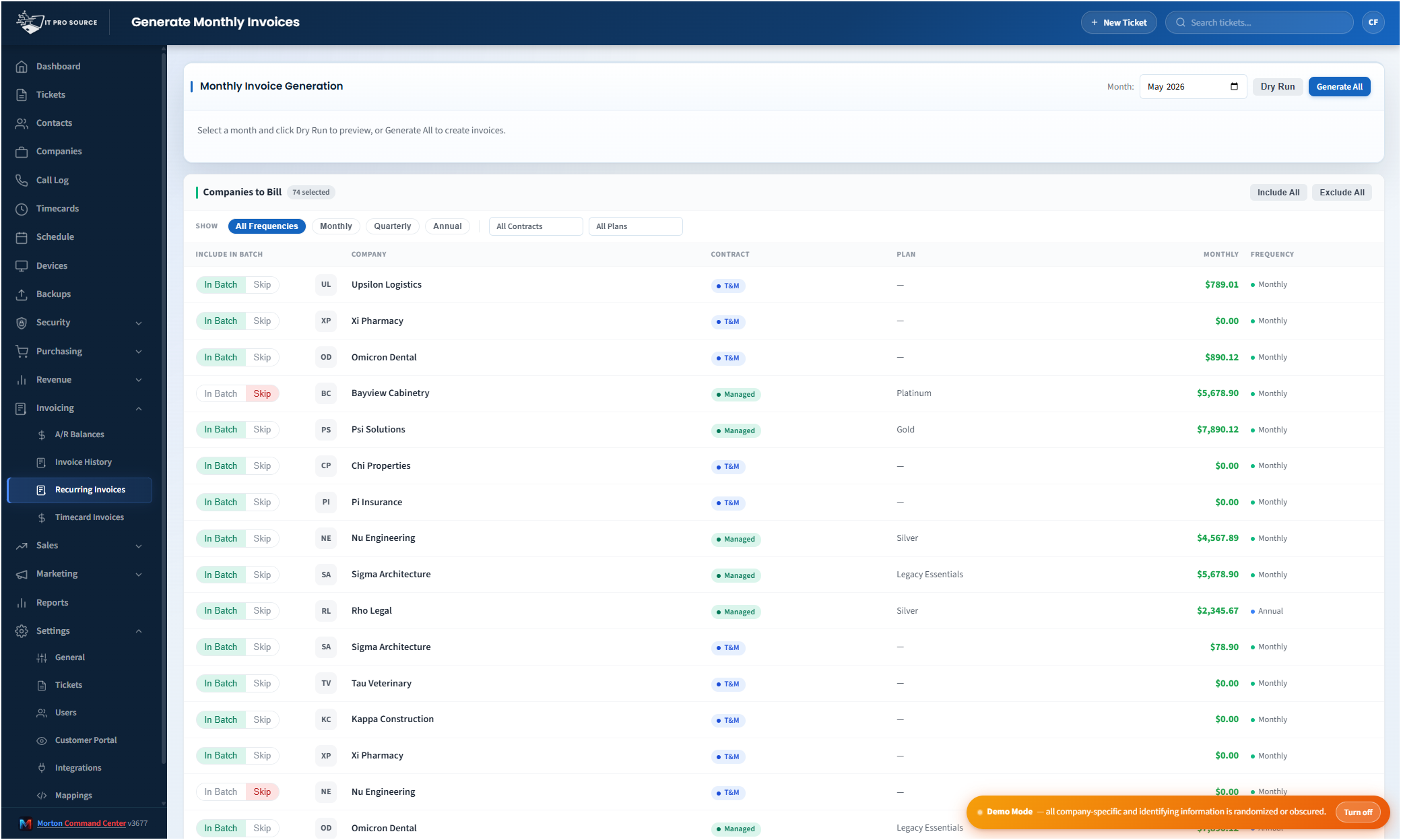
QuickBooks runs the books at most US MSPs: Online for the majority, Desktop for the shops that never left it, and Enterprise for the ones that outgrew Pro. The problem was never QuickBooks; it's the manual reconciliation between QuickBooks and every other system your MSP runs. Month-end becomes a multi-day exercise of pulling device counts from your RMM, time entries from your time tracker, license counts from your distributor, and typing them into QuickBooks invoices by hand.
Morton Command Center automates the entire bridge.
A hybrid platform: not off-the-shelf, not from scratch
Most MSPs face two bad options for billing automation: bend the business to a big all-in-one platform's billing model and migrate into its database, or commission a from-scratch custom build that takes months and a small fortune. Morton Command Center is the middle path: a proven platform core, personalized to your stack and your billing rules. You get the polish and reliability of an out-of-the-box product with the fit of software written for your MSP specifically, and you keep every tool you already run.
How the automation actually works
Morton Command Center pulls billing-relevant data from every connected system on its own schedule, then generates invoice line items pre-populated with the right quantities. At month-end, your bookkeeper opens a queue of pending invoices, reviews them (every line is editable), and pushes them to QuickBooks with one click.
- Device counts from your RMM (whatever you run) auto-populated to per-device line items by client.
- License and seat counts from your distributor (Pax8) or M365: read for visibility and reconciled against the customer's purchased entitlements, so the right quantities land on the invoice.
- Backup coverage status surfaced alongside each client, so a protected workload that fell off backup gets noticed before it shows up (or doesn't) on the invoice.
- Time entries from your time tracker or PSA, grouped by client and matter, with rate logic applied.
- Project work tracked separately, with milestone billing or T&M, depending on the SOW.
- À la carte add-ons (extra storage, hourly rates beyond plan, after-hours work), logged through the year, billed on the right cycle.
Your RMM, PSA, and time tracker stay the source of truth: Morton Command Center reads from them, never replaces them.
QuickBooks Desktop vs Online
Whichever accounting system you run, we build the connector to fit it as part of your engagement. QuickBooks Desktop connects via a Web Connector running on the QB Desktop machine, built custom to your stack. QuickBooks Online has a clean REST API and connects the same way: built around your setup as part of your build. Running Xero, Sage, FreshBooks, or another accounting system? If it exposes an API, we build that connector for you, custom. Once it's wired, the automation feels identical from your side. The short version: if your tool has an API, we build the connector for it.
Why this matters more than any other automation
For most MSPs, billing closeout is the single biggest drain on senior staff time and the single biggest source of revenue leakage. Time entries forgotten. Hours not invoiced. Devices added mid-month and missed on the next invoice. License counts off by ten because nobody reconciled the distributor portal (Pax8, or whatever you buy through) to your accounting system. The cost of getting billing wrong adds up to thousands of dollars a month for a mid-sized MSP, and the cost of doing billing manually is days of senior time.
The team running Morton Command Center inside IT Pro Source went from a two-day month-end exercise to about an hour of review and approval, and the reconciliation surfaced charges the manual process had been missing. See the full IT Pro Source story →
What you keep doing in QuickBooks
Your accounting system remains the system of record for your books. With QuickBooks, customers, items, classes, and the chart of accounts all stay there. Morton Command Center mirrors what it needs (customer mappings, item codes, billing tiers) and pushes invoices in. The same holds for any accounting system with an API (Xero, Sage, or whatever you run), with the connector built for your stack as part of your engagement. Your accountant never has to learn a new tool; they keep working in their books exactly as they always have.
Pricing
Morton Command Center uses transparent flat-rate pricing. No per-seat, per-endpoint, or per-ticket fees. Add five more techs next year and your Morton Command bill doesn't change: you billed more, but you paid the same. See current pricing on the homepage →
Launch pricing is active through December 31, 2026: sign up by then and your rate is locked in for life.
Ready to close the month in an hour?
The first call is a 30-minute discovery: we map how your invoices are built today, which counts are being typed by hand, and what your accounting system needs on the far end. No commitment, no sales pressure.
Questions first? Email [email protected] or read the FAQ.
Related solutions
Billing automation is built into your Morton Command Center: the same platform that unifies your tickets, devices, security, and time tracking in a single dashboard. If this page resonates, these adjacent angles probably will too:
- Automated MSP Invoicing: the broader invoice-automation story.
- Pax8 + QuickBooks: the license-reconciliation piece.
- ConnectWise + QuickBooks: ConnectWise agreements, tickets and time turned into QuickBooks Desktop invoices.
- NinjaOne + QuickBooks: live NinjaOne device counts billed through QuickBooks Desktop.
- Time Tracking + Billing: how time entries become invoice lines.
- Consolidate Your MSP Stack: the unified-data-layer pattern.
Further reading
- How MSPs automate QuickBooks Desktop without opening a firewall port: the security architecture behind the QuickBooks Desktop connection.