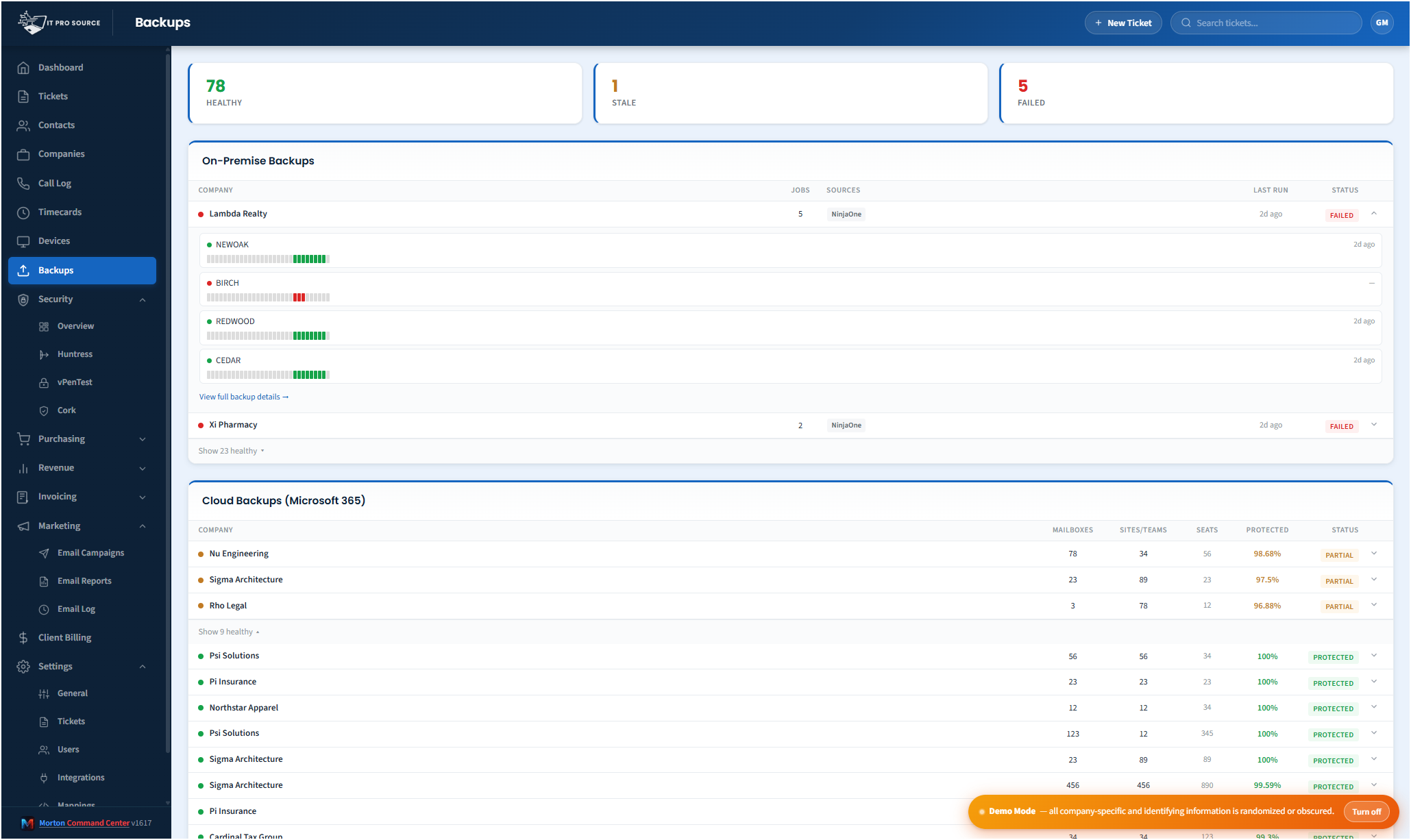
Most MSPs run multiple backup vendors across their client base. One client is on Datto. Another runs Veeam on-prem. A third is on Cove. M365 mailboxes get backed up by something separate. Synology owners use Synology's built-in tooling. Each vendor has its own console, its own alert format, its own definition of "successful." Knowing whether last night's backups all completed cleanly across your entire client base requires logging into four to six places.
Morton Command Center pulls every backup status into one operational view.
What gets unified
- Server-class backups from Veeam, Datto Continuity, Cove, Acronis, Unitrends.
- Cloud workload backups for AWS, Azure, GCP workloads.
- Microsoft 365 backups from Datto SaaS Protection, AvePoint, Skykick, Veeam M365.
- NAS / Synology backups from Synology HyperBackup, QNAP HBS3.
- Endpoint backups where applicable.
The "healthy clients collapsed" view
The default dashboard is structured by exception. Clients with all backups green are collapsed into a single row. Clients with any failure surface fully expanded with the failure details inline. The view is, by default, what needs attention — not a wall of green you have to scan.
One click expands a healthy client if you need to verify state. One click into a failure shows the device, the last successful run, the last failure detail, and a link to the source vendor's console for action.
Per-customer backup posture
The unified view also generates a per-customer backup summary that shows up in every company view in Command Center. Clients with a backup gap (no recent successful run on a critical machine) get flagged. This rolls up into the security posture too — backup readiness is part of incident response.
Why bothering with this matters
Backup failures are the most common "we have it covered" gap at MSPs. Everyone says they monitor backups. In practice, alerts get muted, vendor consoles get checked weekly instead of daily, and the failure that matters — the one before a ransomware event — sits unaddressed because it didn't make enough noise. Putting every signal in one screen, structured by exception, fixes this in the most basic way: you cannot miss what you can't avoid seeing.
The reporting follow-through
Beyond live monitoring, Command Center generates weekly and monthly backup reports per customer — ready to attach to QBR documents or send proactively. The reports include the rolling success rate, recent failures and their resolutions, and a posture summary. Customers stop wondering whether you're really watching, because you can prove it on cadence.
Pricing
Morton Command Center uses transparent flat pricing. There is one build fee, one monthly hosting fee, and one monthly reserved-hours block — no per-seat surprises and no annual escalators tied to your team size.
- $5,500 one-time build. Your custom platform — discovery, integrations, branding, deployment.
- $350 / month flat hosting. Edge infrastructure, security patches, vendor API key management, uptime monitoring.
- $1,250 / month reserved hours. Ten reserved engineering hours every month for tweaks, new integrations, or feature requests. Unused hours roll over.
Founding Five pricing. The first five MSPs to sign on lock in this rate for the lifetime of their account. Standard pricing — for everyone after — is expected to be roughly 50% higher. Founding Five rates never change, even as the platform grows.
Related solutions
Morton Command Center is built around your specific stack. If this page resonates, these adjacent angles probably will too:
- MSP Security Operations — Why backup belongs in security view.
- Consolidate Your MSP Stack — The general consolidation pattern.
- NinjaOne + Huntress + Cork — Companion security-stack consolidation.
- White-Label Client Portal — How backup status surfaces to clients.
Ready to talk?
The first call is a 30-minute discovery — we map your existing tools and workflows together, scope what a custom Command Center build would look like for your MSP, and decide whether the fit is right. No commitment, no sales pressure.
Questions first? Email [email protected] or read the FAQ.