Almost every MSP we've talked to runs accounts receivable the same way: someone opens QuickBooks on the one machine that has it installed, runs the A/R aging report, exports it, pastes it into a spreadsheet, color-codes the rows that are getting scary, and emails it around. Once a month if you're disciplined. Once a quarter if you're honest.
The problem isn't that the report is hard to run. It's that the report is stale the moment you export it, it lives somewhere only the bookkeeper can reach, and the techs and account managers who actually talk to the client every week have no idea that client is sitting at 75 days past due. By the time AR aging becomes visible to the people who could do something about it, it's a collections problem instead of a friendly "hey, looks like an invoice slipped through" conversation.
When we built the Invoicing module in Morton Command Center, the A/R Balances view was one of the first things we wanted to get right, because the math here is genuinely simple, and the only thing standing between an MSP and a live aging picture is plumbing.
Where the numbers actually come from
Here's the honest boundary, because it matters: Morton Command Center reads your A/R straight from your accounting system, through an integration we build custom to your stack as part of your engagement. If you're on QuickBooks Desktop, CC talks to it through Conductor, a local sync agent that runs alongside your QuickBooks install and never opens an inbound firewall port, so your books are never exposed to the internet. And because the platform is API-driven, any accounting system that exposes an API (QuickBooks Online, Xero, Sage, NetSuite, or whatever you run) connects the same way: we build that integration to fit your books. If your tool has an API, we build the integration: custom to your stack.
To be clear about the accuracy distinction: whatever accounting system you run, the integration we build reads the same authoritative balances straight from the source. If you're on QuickBooks Desktop (and a surprising number of established MSPs still are, precisely because switching accounting systems mid-stream is miserable), the aging numbers you see in CC are the same numbers your bookkeeper sees in QuickBooks (open invoices, partial payments, credits, the works) because they are those numbers. On any other accounting system, CC reads those same authoritative balances straight from the source through the integration we build for it. We don't keep a parallel ledger or re-derive balances from our own assumptions; we read what your accounting system already knows and present it.
That single fact changes the whole dynamic. There's no "I think that's paid, let me check" because the source of truth is the source of truth. When a payment lands in your accounting system, the next sync reflects it.
Bucketed by age, the way you already think about it
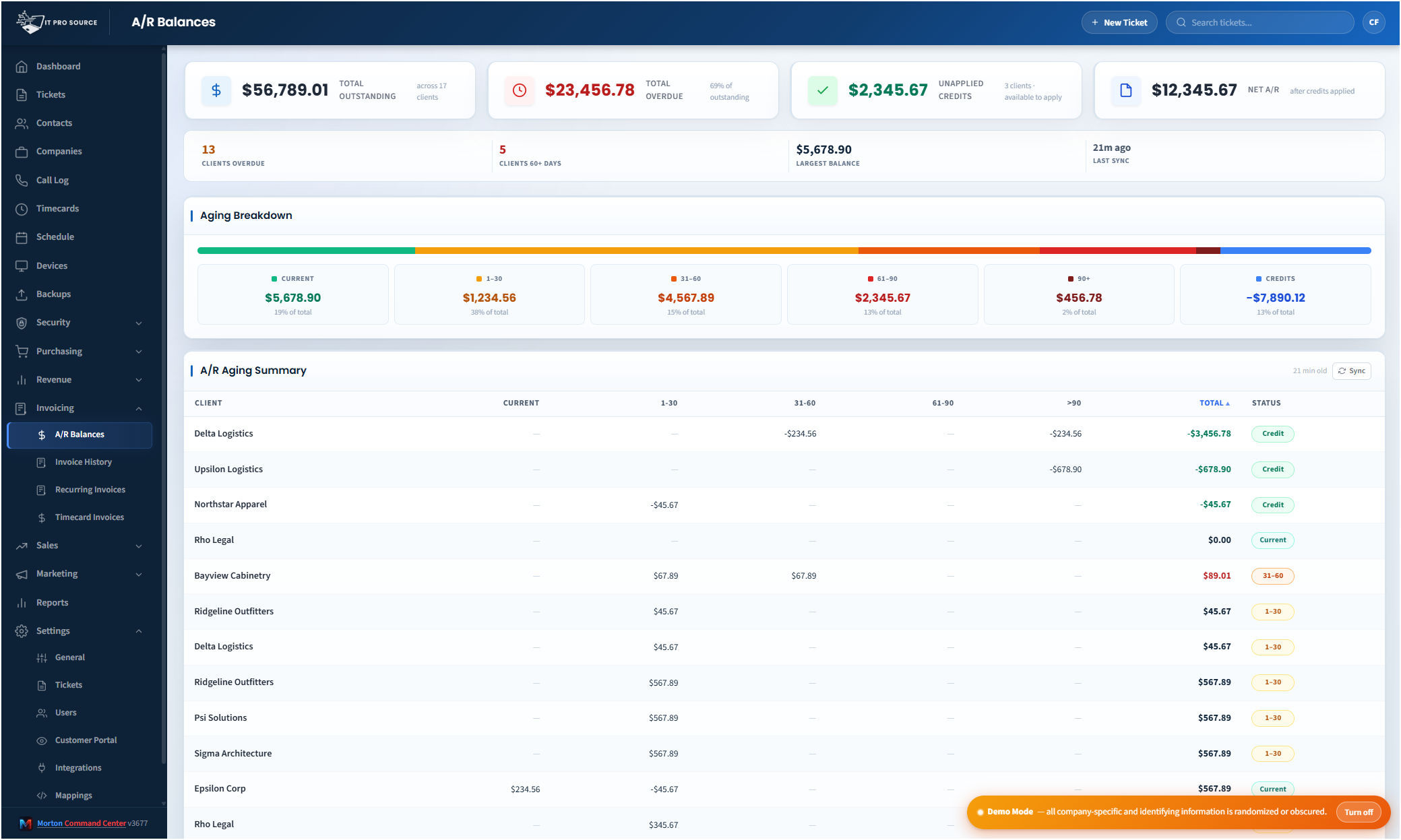
The A/R Balances view groups every open balance into the aging buckets everyone in finance already lives in (current, 1–30 days, 31–60, 61–90, and 90+ days) per client, with a total balance per company alongside the breakdown. So instead of one undifferentiated "they owe us $14,000" number, you see that $9,000 of it is current and fine, $2,000 is in the annoying-but-normal 30-day band, and $3,000 has crossed into the 90-day territory that actually needs a phone call this week.
That bucketing is the whole game. A flat receivables total tells you nothing about urgency. The aging breakdown tells you exactly which conversations to have and in what order, and it lets you spot the one client who's quietly drifted older every month before they become a write-off.
Nobody needs a QuickBooks login
This is the part that quietly fixes the org-chart problem. In most shops, the A/R aging report is gated behind an accounting-system seat: QuickBooks Desktop seats, for example, are expensive and limited, so the bookkeeper has one and almost nobody else does (the same bottleneck exists on most accounting platforms). That's why aging never reaches the people who talk to clients.
In Morton Command Center, the A/R picture lives in the same dashboard your team already uses every day. No accounting-system login required: no QuickBooks seat, and nothing on whatever accounting platform you happen to run. An account manager who's never touched the books in their life can pull up a client, see they're sitting at 60 days, and weave a gentle nudge into the next check-in call, without ever asking the bookkeeper to run a report.
And because CC has real role-based access control, you control who sees the money. Finance and managers get the full aging picture; technicians without a billing role don't see financials at all. So "everyone who needs it" doesn't mean "everyone": it means the right people, scoped server-side, not a spreadsheet emailed to a distribution list and then forwarded who-knows-where.
It loads fast because it's already warm
If reading A/R meant hitting your accounting system live every time someone opened the page, the page would be slow and you'd be hammering that system all day. So we don't do that. CC keeps its caches cron-warmed: a scheduled job pulls the latest data from your accounting system (whatever it is, via the integration we build for your stack) on a regular cadence and stores it, so when you open A/R Balances the numbers are already sitting there waiting. The page loads in seconds, not in a "spinning while we query the books" wait.
Two honest caveats, because we'd rather you trust the tool than be surprised by it. First, this is near-real-time, not real-time: the figures are as fresh as the last sync, and there's a manual Refresh if you want to force a pull right now. Practically, that means you might be looking at numbers from earlier today rather than from this exact second, which for collections is completely fine, and a world away from "from last month's exported spreadsheet." Second, the warming runs on a schedule that respects whether anyone's actually using the system, so we're not pounding your accounting system at 3 a.m. for a page nobody's looking at.
Where AR aging fits in the bigger billing loop
AR aging isn't a standalone widget: it's the back end of the whole billing chain. The front end is generating the invoices in the first place: CC creates invoices directly in your accounting system (whatever platform you run, through the integration we build for it) including generating them from unbilled timecards and recurring billing config so the end-of-month scramble stops being a scramble. The A/R Balances view is simply where you watch what happens after those invoices go out: what's been paid, what's drifting, and what needs a nudge.
That closed loop is the point. Time gets tracked, invoices get created in your accounting system, payments come in, and the aging picture updates, all visible in one place, to the people who can act on it, without anybody re-keying a number from one system into another. The accounts receivable piece used to be the part of that loop that disappeared into a spreadsheet. Now it's just another tab everyone can see.
What to do this week
Even if you never touch our product, the takeaway holds: get your aging in front of the people who talk to clients. Right now, the gap between "the bookkeeper knows" and "the account manager knows" is probably weeks wide, and that gap is where receivables go to die. Pull last month's aging report and ask one question: who outside of finance has actually seen this? If the answer is "nobody," that's your leak.
The fix is structural, not heroic. You don't need someone to chase invoices harder; you need the right numbers, bucketed by age, in front of the right people, fresh enough to act on. Once aging is just visible (quietly, all the time, to everyone who should see it), the 90-day column stops filling up, because somebody catches it at 35.
Both ends of that loop (invoicing and A/R) are native, and the platform is flat-rate, so putting aging in front of your whole team doesn't cost you a seat. See current pricing on the homepage →