You're billing less than you should be — and you can't see it.

Morton Command Center compares what your tools say against what each client is actually billed. Device counts from your RMM, seats from your Microsoft 365 tenant, licenses through your distributor — all lined up next to the plan, contract, and monthly rate on file, so drift between reality and the invoice stops hiding. If your tool has an API, we support it.

Most MSPs lose money to under-billing, not over-billing. A device gets onboarded but never added to the contract. A client grows from 40 seats to 55 and the rate never moves. Reconciliation catches the gap before it becomes a quarter of give-away support.

Tools vs. invoice
Counts compared against what's billed
Drift surfaced
Unconfigured and unbilled clients flagged
Recover, then bill
Catch the gap, then invoice it correctly
Where the money leaks

Three kinds of drift, all catchable

Morton Command Center reconciles the numbers that quietly fall out of sync between your stack and your contracts — the places under-billing hides month after month.

Device counts vs. the contract

Your RMM — NinjaOne, Datto, or whatever you run — knows exactly how many devices a client runs. Your contract has a number too, and they drift apart every time a machine is onboarded without a billing update. Morton Command Center puts the live device count next to the plan and rate on file so the gap is impossible to miss. Because the platform is API-driven, we build the connection to your RMM — NinjaOne, Datto, or whatever you run — custom to your stack as part of your engagement.

Seats & licenses vs. what's billed

Seat counts from your Microsoft 365 tenant and subscription quantities from your distributor — Pax8 today, or whatever you buy through — are the truth of what a client consumes. The invoice should match, but seats grow, licenses get added, and the billed quantity lags behind. CC reads the seat and license numbers and lines them up against the billing config so the lag is visible. We build the connection to your distributor or license source — Pax8 or any tool with an API — custom to your stack as part of your build.

Clients with no billing set at all

The most expensive gap is the client who was never configured. CC's client-billing view flags every company whose plan, contract, or rate is still unset — so an account that's been getting full managed service for months without a matching plan stops slipping through.

Feature spotlight

Every client's billing, side by side

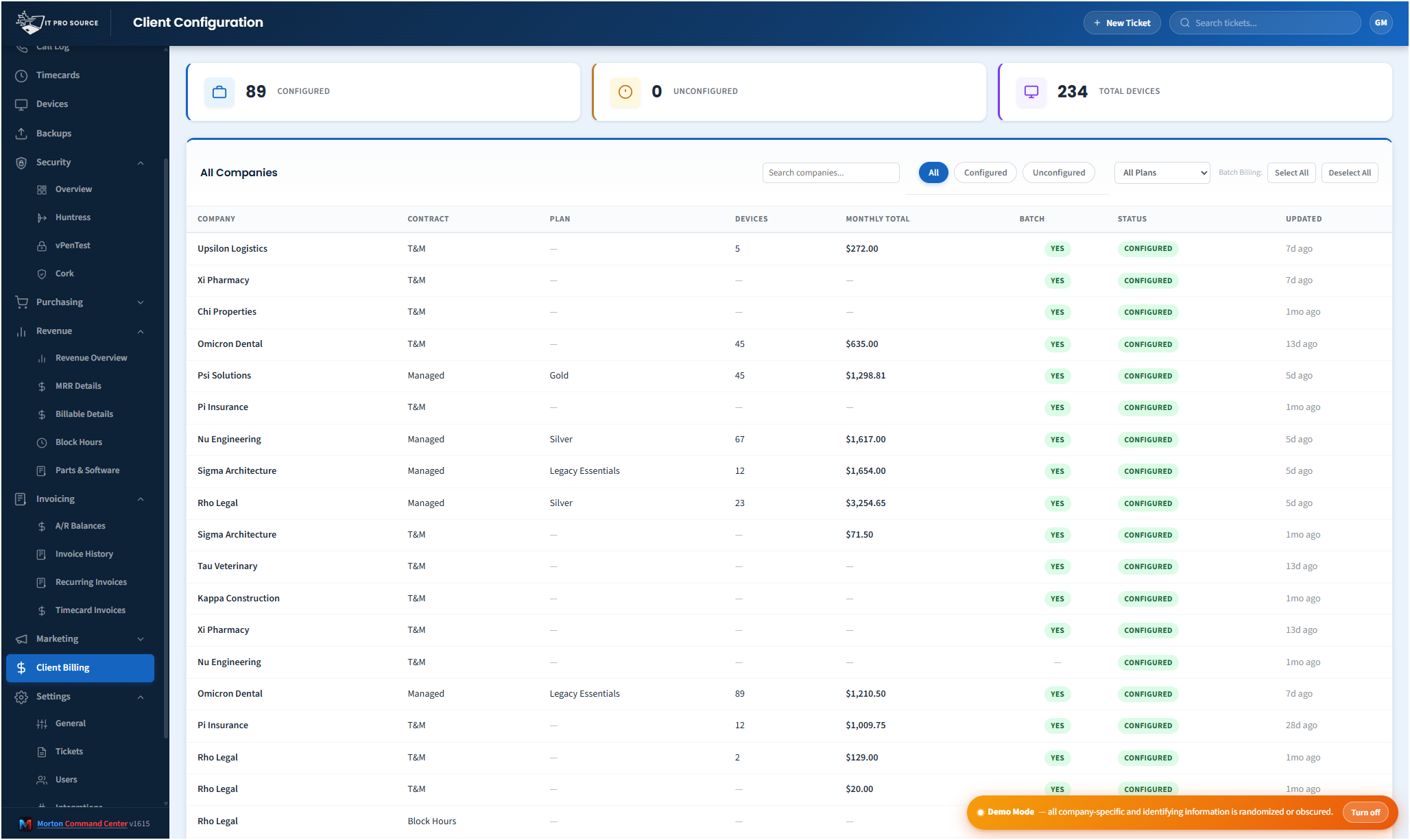
Here's the client-billing view — every company with its contract, plan, monthly rate, and configuration status in one place, so unconfigured and unbilled accounts surface at a glance instead of staying buried in a spreadsheet.

See it in action
cc.yourmsp.com
Client billing reconciliation view in Morton Command Center — every company listed with contract type, plan, monthly rate, and a configuration status column showing which accounts are configured versus unset, with summary counts of configured and unconfigured clients at the top
Sample layout
Each company shows its contract, plan, and monthly rate next to a configuration status. The counters at the top — configured versus unconfigured — make it obvious how many clients still need a billing setup before they can be reconciled against what your tools report.

Most MSP billing conversations focus on the fear of over-charging a client. The real, recurring loss is the opposite: under-billing you never notice.

Devices get onboarded between billing cycles. A client quietly grows from 40 Microsoft 365 seats to 55. A new backup gets stood up. A license is added through your distributor to solve a problem fast. Each one is a small, reasonable operational decision — and each one is a billable change that may never make it onto the next invoice. Nobody is trying to give work away. The drift just accumulates in the gap between the tools that hold the truth and the contract that holds the price.

Morton Command Center closes that gap by reconciliation.

It reads the real numbers out of the tools you already run, lines them up against the plan and rate each client is configured for, and makes the difference visible — so under-billing surfaces while it's still a few seats, not after it's been a free upgrade for a year.

What "reconciliation" actually means here

Reconciliation is just a disciplined comparison: what the tools say versus what the client is billed. Morton Command Center brings both sides into one view per company so you don't have to assemble them by hand.

On the "what the tools say" side, CC reads from the systems that already hold the source of truth:

  • Device counts from your RMM (NinjaOne, Datto, or any RMM with an API — built custom to your stack)
  • Seat and mailbox counts from your Microsoft 365 tenant
  • License and subscription quantities from your distributor (Pax8 or any distributor with an API — built for your stack)
  • Backup status rolled up per company across your backup tools

The named tools above are examples of integrations we build — but the mechanism is the API, not the brand. If your tool has an API, we build the integration — custom to your stack as part of your engagement.

On the "what the client is billed" side sits the billing configuration you've set up in CC — each company's plan, contract type, and monthly rate. When the live counts and the configured plan disagree, that's drift, and drift is where revenue leaks.

None of this requires moving your data anywhere. Morton Command Center reads from your RMM, your Microsoft 365 tenant, and your distributor — through normalized, API-driven adapters we build for your exact stack — and lays the numbers next to your billing config. Your RMM, your distributor, and your tenant stay exactly where they are — nothing migrates, nothing gets ripped and replaced.

Start by finding the clients nobody set up

The fastest revenue you'll recover usually isn't a subtle seat-count mismatch — it's the client who was never configured for billing at all.

The client-billing view in Morton Command Center lists every company alongside its contract, plan, monthly rate, and a status that tells you whether billing is configured or still unset. The summary counters at the top — how many clients are configured versus unconfigured — turn a vague worry into a hard number you can work down.

That single status column does a lot of work. An account showing "not set" while your RMM is actively managing its devices is exactly the kind of relationship that's been getting full service without a matching plan. You can't reconcile a client you never priced, so getting every company configured is step one — and CC makes the missing ones impossible to overlook.

From drift to a correct invoice

Surfacing the gap is the point — but it's only half the value. Once reconciliation shows you a client is under-billed, the same platform helps you do something about it.

Because Morton Command Center already holds each client's billing configuration, the corrected quantities flow straight into the rest of the billing workflow. When you generate invoices, the recurring lines build from the plan and current counts rather than from a number someone typed in months ago. The reconciliation view and the invoice run draw from the same source, so a fix in one shows up in the other.

You stay in control the whole way. Reconciliation flags the difference; a human decides whether it's a real billing change, a client conversation, or a legitimate exception. CC doesn't quietly re-price anyone behind your back — it gives your team the comparison and the context, and you make the call.

Near-real-time numbers, on a schedule you can trust

The counts CC reconciles against are kept current automatically. Morton Command Center warms its caches from your tools on a schedule — device, seat, and license data refreshed within minutes to hours depending on the source — so the comparison reflects where each client is now, not where they were at the last manual export. There's a manual refresh when you want the latest immediately, and the numbers update without anyone re-keying a spreadsheet.

This is the difference between catching drift continuously and catching it once a year during an audit. By the time an annual review finds a client running fifteen extra seats, you've already given away months of revenue. Ongoing reconciliation shrinks that window to the time between billing cycles.

Built on your stack, configured to how you actually bill

Reconciliation only works if it understands your specific tools and your specific contracts — which is exactly why every integration is built custom to your stack. Whatever your RMM, distributor, or accounting system — NinjaOne, Datto, Pax8, Microsoft 365, Xero, Sage, or anything else — we build that connection to fit how you actually work, instead of forcing you onto a generic toggle that may or may not match your setup. That's the advantage of a platform built around your stack rather than a rigid all-in-one suite with its own fixed list of pre-wired integrations. Because the platform is API-driven, if your tool has an API, we build the integration — custom to your stack.

The billing side is configured the same way — to your plans, your tiers, and your contract types — so the comparison reflects how your MSP prices work, not a template you have to bend yourself around. Morton Command Center sits on top of the stack you already run; it doesn't ask you to abandon any of it.

Pricing

Morton Command Center uses transparent flat-rate pricing — no per-seat, per-client, or per-invoice fees. Whether you're reconciling 10 clients or 100, your monthly cost is the same — which means the revenue you recover is yours to keep, not clawed back by usage-based tooling fees. See current pricing on the homepage →

Founding Five program is active — the first five customers lock in their rate for the lifetime of their account. See current pricing on the homepage →

Related solutions

Reconciliation is one piece of a tighter billing operation. If catching drift resonates, these adjacent angles probably will too:

Ready to find the revenue you're already earning?

If you've ever suspected your invoices don't fully match the work your tools are doing, you're probably right — and you can't fix what you can't see. Morton Command Center was built to make the gap visible.

We'll map your RMM, your distributor, your Microsoft 365 tenant, and your contracts, then show you what reconciling reality against your billing config looks like for your MSP — and how much of it you've been giving away.

One 30-minute call could surface revenue you've been missing every month.

Schedule a Consultation

Questions first? Email [email protected] or read the FAQ.