Never let a contract or license renewal slip past you again.

Morton Command Center surfaces every upcoming contract renewal across your client base on one radar — sorted by what's due soonest — so a lapsed agreement or an auto-renewed seat count never catches you off guard. Contract renewal dates are computed from your billing config, while each client's marketplace subscriptions and identity-platform license counts — fed by integrations we build to fit your exact stack, whether that's Pax8 and Microsoft 365 or whatever you run with an API — sit alongside them on the company's Licenses & Renewals tab.

See what's coming, what needs review, and what has stale data — all in one place. Renewals stop being a calendar reminder you forgot to set and become a managed pipeline.

Every client
Renewals across your whole base, one view
Due soonest first
Sorted by renewal date, not buried in folders
From your tools
Billing config plus your marketplace and identity platform — integrations built to fit your stack, anything with an API
The renewal radar

Catch renewals before they lapse

Morton Command Center pulls renewal dates and contract terms from the systems you already run, then groups them by urgency — so the agreement that expires next month and the seat count that drifted are both impossible to miss.

Upcoming renewals, sorted by date

Every contract and license renewal lands on a single radar, ordered by what's due soonest. Each row shows the client, contract type, plan, contract length, and the renewal date — so you can see at a glance what's coming in the next 30 days and what's further out. No more digging through individual client folders to find out which agreement quietly auto-renews next week.

Renewal sources you already trust

Renewal dates come from your billing config; license quantities come from your distribution marketplace and your identity platform's license and seat counts. Those integrations are built to fit your exact stack — whether that's a marketplace like Pax8 and an identity platform like Microsoft 365 or whatever you run — and because the platform is API-driven, any distributor or identity provider with an API gets the same custom integration. Nothing is re-entered by hand. Morton Command Center reads these systems and assembles the renewal picture for you — your marketplace and identity tenant stay exactly where they are.

"Needs review" and stale-data flags

The radar separates renewals that need attention from the routine ones, and flags clients whose renewal data looks stale or incomplete. Instead of trusting that every contract date is current, you get a working queue — review what's flagged, fix what's missing, and move on with confidence that nothing is silently expired.

Feature spotlight

The renewals radar, up close

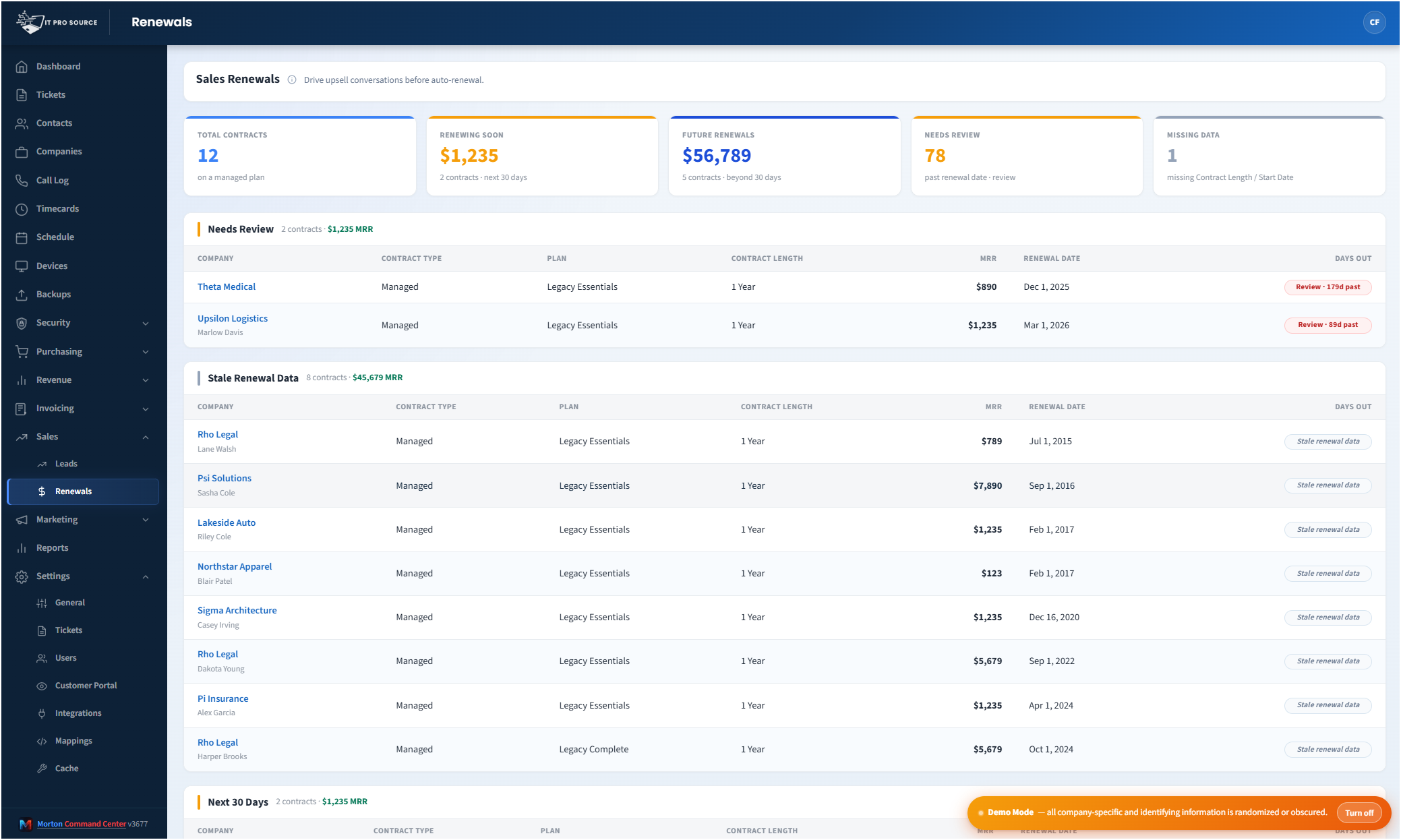
Here's the renewals view in action — summary tiles for what's due soon and what needs review, then every client's renewal grouped by urgency and sorted by date.

See it in action
cc.yourmsp.com
Renewals radar in Morton Command Center — summary tiles for total contracts, renewals due soon, future renewals, and items needing review, above a list of clients grouped into Needs Review, Stale Renewal Data, and Next 30 Days with contract type, plan, contract length, value, and renewal date columns
Sample layout
The renewals radar groups every client into Needs Review, Stale Renewal Data, and Next 30 Days, with contract type, plan, length, and renewal date in line — so the next agreement to expire is always at the top. Account values are shown to billing-entitled roles only and stripped for everyone else.

Renewals are where margin quietly leaks out of an MSP.

A managed-services agreement lapses because nobody flagged the end date. A license count drifts after a client adds staff and never gets re-billed. An auto-renewing contract rolls over on terms you would have renegotiated if you'd seen it coming. None of these are dramatic failures — they're small, recurring oversights that add up across a client base.

The fix isn't a sticky note. It's making renewals impossible to miss.

Morton Command Center gathers every upcoming contract and license renewal onto one radar, sorted by what's due soonest, and pulls the dates and terms from the systems you already run. Renewals stop living in scattered calendar reminders and start living in a queue your team can actually work.

Where the renewal data comes from

Morton Command Center doesn't ask you to re-key renewal dates into yet another tracker. It draws on the sources that already hold the truth. If your tool has an API, we build the integration for it — custom to your stack:

  • Contract renewal dates are computed from your billing config — each client's contract type, plan, contract length, and start or last-renewal date, exactly as you've configured their billing. That's what drives the renewals radar and its due-soonest ordering.
  • Your distribution marketplace — the subscription and usage data Morton Command Center reads to keep billing accurate gives you each client's license quantities and billing terms. We build that marketplace integration for your stack — whether that's Pax8 or any other marketplace with an API, it gets the same treatment.
  • Your identity platform's license and seat counts — read directly from your tenant, so the seat numbers reflect reality, not last quarter's spreadsheet. We build that integration to fit what you run — whether that's Microsoft 365 or any identity or directory platform that exposes an API, it's integrated the same way.

The marketplace and identity-platform license picture — Pax8 and Microsoft 365 in a typical stack — sits alongside each client's renewals on their company Licenses & Renewals tab, so the seat counts behind an upcoming renewal are right there when you need them. Because everything is fed from these systems, it stays current without manual upkeep. Your distributor and your identity tenant are read for their license data — Morton Command Center never writes changes back into your directory, and nothing about your existing tools moves or migrates.

A working queue, not just a list of dates

A flat list of renewal dates is easy to ignore. The renewals view is built to be worked instead.

Summary tiles across the top tell you the shape of your renewal pipeline at a glance — total contracts, how many are due soon, how many are further out, and how many need attention. Below that, clients are grouped by urgency: the ones that need review, the ones whose renewal data looks stale or incomplete, and the ones coming up in the next 30 days.

Each row carries the details that matter for the conversation — company, contract type, plan, contract length, and the renewal date itself. So when you sit down to handle renewals, you're not gathering information first. It's already in front of you.

Stale-data flags catch the renewals you didn't know were broken

The most dangerous renewal isn't the one you can see — it's the one whose data is wrong. A missing renewal date, an outdated contract length, a client whose billing config never got updated after a plan change.

Morton Command Center calls these out explicitly. Instead of assuming every contract date is accurate, the radar separates clients with clean, current renewal data from those whose information needs a second look. That turns "I hope our records are right" into a short list you can actually fix.

Renewals that flow straight into the rest of your operation

Renewal tracking isn't a standalone tool bolted on the side. It's one view inside the same platform that runs your tickets, your billing, and your client portal — which is what makes it useful.

The same billing config that drives your invoices drives your renewal dates, so the two never disagree. The marketplace and identity-platform license data — fed by integrations we build for your stack, whether that's Pax8 and Microsoft 365 or whatever you run with an API — that feeds your recurring invoices is the same data that warns you when a renewal is coming. And each client's renewals also live on their company detail page, under a Licenses & Renewals tab, alongside their security posture, backup status, devices, and invoices — so a renewal conversation has full account context behind it.

You can even surface renewals to clients themselves. The white-label customer portal includes an optional Licenses & Renewals section, so clients see their own upcoming license counts and renewal dates in your branding — turning a renewal from an awkward ask into an expected, transparent step.

Role-aware, so the right people see the right detail

Renewals touch money, and not everyone on your team should see the dollars. Morton Command Center applies real role-based access control to the renewals view: sales reps without a billing entitlement can work the renewal pipeline — dates, contract length, what's due — while account values are stripped from their view entirely. Finance and admin roles see the full financial picture.

Scoped technicians and reps see only the companies they're assigned to, enforced on the server. So a renewals radar shared across your team shows each person exactly what their role permits — no more, no less.

Kept current automatically — within minutes, not in real time

The renewal data behind the radar is refreshed on a schedule. Morton Command Center warms its caches on regular cron cycles — your identity platform's license data nightly, your marketplace and billing data on their own cadence (Microsoft 365 and Pax8 in a typical stack, or whatever you run with an API, integrated to fit your build) — so the numbers you see reflect recent reality without you hammering an API. It's near-real-time: updated within minutes of a refresh cycle, not the instant a change happens upstream. When you want the very latest, a manual refresh pulls it on demand.

The practical effect: you open the renewals view and trust that what's there is current, every time.

Pricing

Morton Command Center uses transparent flat-rate pricing — no per-seat, per-client, or per-renewal fees. Whether you track renewals for 10 clients or 100, your monthly cost is the same. See current pricing on the homepage →

Founding Five program is active — the first five customers lock in their rate for the lifetime of their account.

Related solutions

Morton Command Center is built around your specific stack. If renewal tracking matters to you, these adjacent angles probably will too:

Ready to stop missing renewals?

If your MSP is still tracking contract end dates in spreadsheets and calendar reminders — and finding out about a lapsed agreement or a drifted seat count after the fact — Morton Command Center was built for you.

We'll map your current billing config, your distributor and identity-platform license data — and build the integrations to fit your exact stack, whether that's Pax8 and Microsoft 365 or whatever you run with an API — and your renewal process. Then we'll show you what a single renewals radar could look like across your whole client base.

One 30-minute call could be the difference between a renewal you renegotiate and one you lose.

Schedule a Consultation

Questions first? Email [email protected] or read the FAQ.