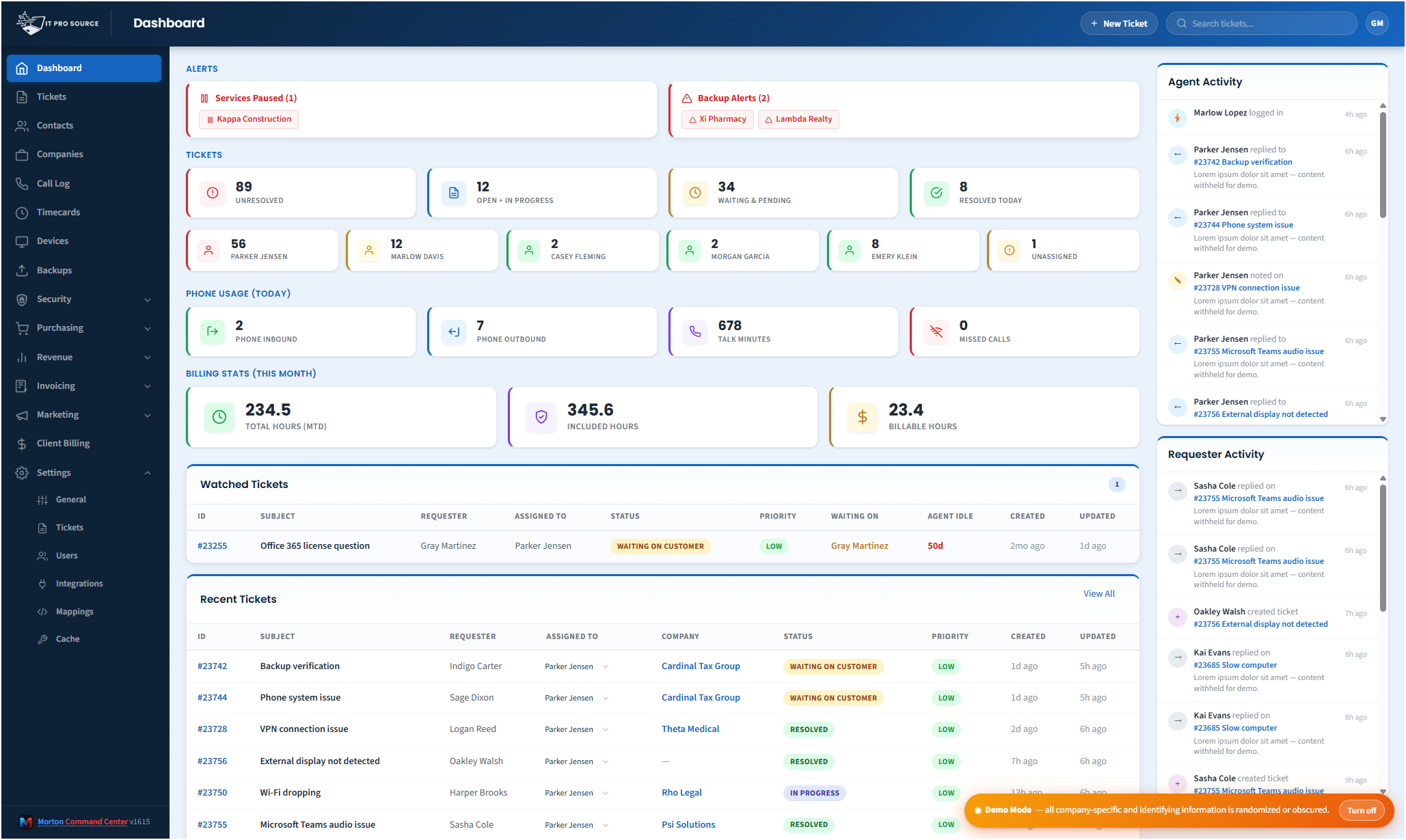
The hidden tax on every MSP team is context switching. A tech opens a ticket, swaps to NinjaOne to look at the device, swaps to a security console to check for alerts, swaps to Outlook to message the client, swaps back to the ticket to update it. Every swap costs a few seconds of cognitive reset and burns minutes of focus. Multiply by every ticket, every day, every tech.
The math is brutal. Industry research on knowledge workers consistently puts context-switching cost at 20-40% of total productive time. For an MSP, that's the equivalent of one tech in five doing nothing all day — except the work still has to get done, so it leaks into evenings, weekends, and burnout.
Where the time actually goes
We mapped this carefully when building Command Center inside IT Pro Source. Per ticket, the average tech was spending:
- ~45 seconds opening the relevant device record in NinjaOne to check status.
- ~30 seconds opening the customer record in QuickBooks to check the contract terms or billing tier.
- ~60 seconds hunting for the customer's contact info because the PSA had it stale.
- ~45 seconds swapping to the security console to make sure no related alert was firing.
- ~30 seconds opening the customer's Microsoft 365 admin center if account work was involved.
That's three to four minutes of pure tab-swap-and-load per ticket. At thirty tickets per tech per day, that's two hours.
What Command Center does about it
Every ticket view in Command Center is the unified ticket view. The same screen shows: ticket history, the device's RMM health and patch status, the customer's billing tier, every other open ticket for the same company, recent backup status, recent security findings, and one-click links into the source vendor only when you actually need it. The tech makes the same decisions but stops paying the swap tax.
The same logic applies to billing closeouts (one screen vs five), security review (one queue across vendors), and onboarding new clients (one workflow that fans out to every vendor automatically).
Real numbers
After the consolidation went live at ITPS:
- Ticket triage time dropped about 40%.
- Monthly billing closeout went from two full days to under three hours.
- After-hours alert volume hitting techs' phones dropped by half because routing rules could finally be cross-vendor.
- Onboarding a new client device through every relevant system collapsed from a 45-minute checklist to a single workflow that takes about 8 minutes.
The result wasn't "fewer tickets." It was the same volume of work, finished earlier, with less burnout, and more capacity for the high-value project work that actually grows revenue.
Why off-the-shelf platforms can't deliver this
Every all-in-one MSP platform on the market wants to be your PSA, your RMM, your billing system. Their consolidation pitch is "use only our suite." That works only if their suite genuinely covers every workflow your MSP has — which it almost never does. Custom-built consolidation is the only way to keep the tools your team likes and still get the unified view.
Pricing
Morton Command Center uses transparent flat pricing. There is one build fee, one monthly hosting fee, and one monthly reserved-hours block — no per-seat surprises and no annual escalators tied to your team size.
- $5,500 one-time build. Your custom platform — discovery, integrations, branding, deployment.
- $350 / month flat hosting. Edge infrastructure, security patches, vendor API key management, uptime monitoring.
- $1,250 / month reserved hours. Ten reserved engineering hours every month for tweaks, new integrations, or feature requests. Unused hours roll over.
Founding Five pricing. The first five MSPs to sign on lock in this rate for the lifetime of their account. Standard pricing — for everyone after — is expected to be roughly 50% higher. Founding Five rates never change, even as the platform grows.
Related solutions
Morton Command Center is built around your specific stack. If this page resonates, these adjacent angles probably will too:
- Consolidate Your MSP Stack — How the unified dashboard works.
- Custom MSP Platform — Why the platform fits your stack and not the other way around.
- Automated MSP Invoicing — Where the biggest single time savings lives.
- No Per-Seat Pricing — Time saved per tech without paying per tech.
Ready to talk?
The first call is a 30-minute discovery — we map your existing tools and workflows together, scope what a custom Command Center build would look like for your MSP, and decide whether the fit is right. No commitment, no sales pressure.
Questions first? Email [email protected] or read the FAQ.