Bill exactly what NinjaOne actually manages.

Morton Command Center reads endpoint and device counts straight from NinjaOne, applies each client's plan and rate, and assembles their recurring invoice with quantities already populated. Then it creates that invoice in QuickBooks Desktop for you — no spreadsheet exports, no manual counting, no agents billed that NinjaOne stopped seeing months ago.

Your RMM stays NinjaOne. Your books stay QuickBooks. Morton Command Center connects the two so the count your techs manage and the quantity your client pays for are always the same number.

NinjaOne → counts
Device totals pulled per client
Counts → lines
Quantities applied to each plan
Review → QuickBooks
Invoice created in QB Desktop
The two-tool loop

From NinjaOne device count to QuickBooks invoice

Morton Command Center sits on top of the tools you already run. It reads what NinjaOne manages, turns those numbers into priced invoice lines, and writes the finished invoice into QuickBooks Desktop — with a human review step in the middle.

Live counts from NinjaOne

Morton Command Center connects to NinjaOne and pulls each client's managed device and endpoint totals on a scheduled sync — so quantities reflect what NinjaOne is actually managing, not a count someone typed into a spreadsheet last quarter. We build your NinjaOne integration custom to your stack.

Counts become priced lines

Each device total maps to the client's plan, tier, and per-endpoint rate inside Morton Command Center. The recurring invoice assembles itself with the right quantities and amounts populated — and surfaces warnings (an unmapped item, a missing customer link, a $0 total) so the run lands in front of you for review before it reaches a customer.

Invoices created in QuickBooks

Once you approve the run, Morton Command Center creates each invoice directly in QuickBooks Desktop through Conductor — a lightweight local sync agent that bridges your on-premises QuickBooks to the cloud without ever exposing it to the internet. No one re-keys a line.

Feature spotlight

Recurring invoices, up close

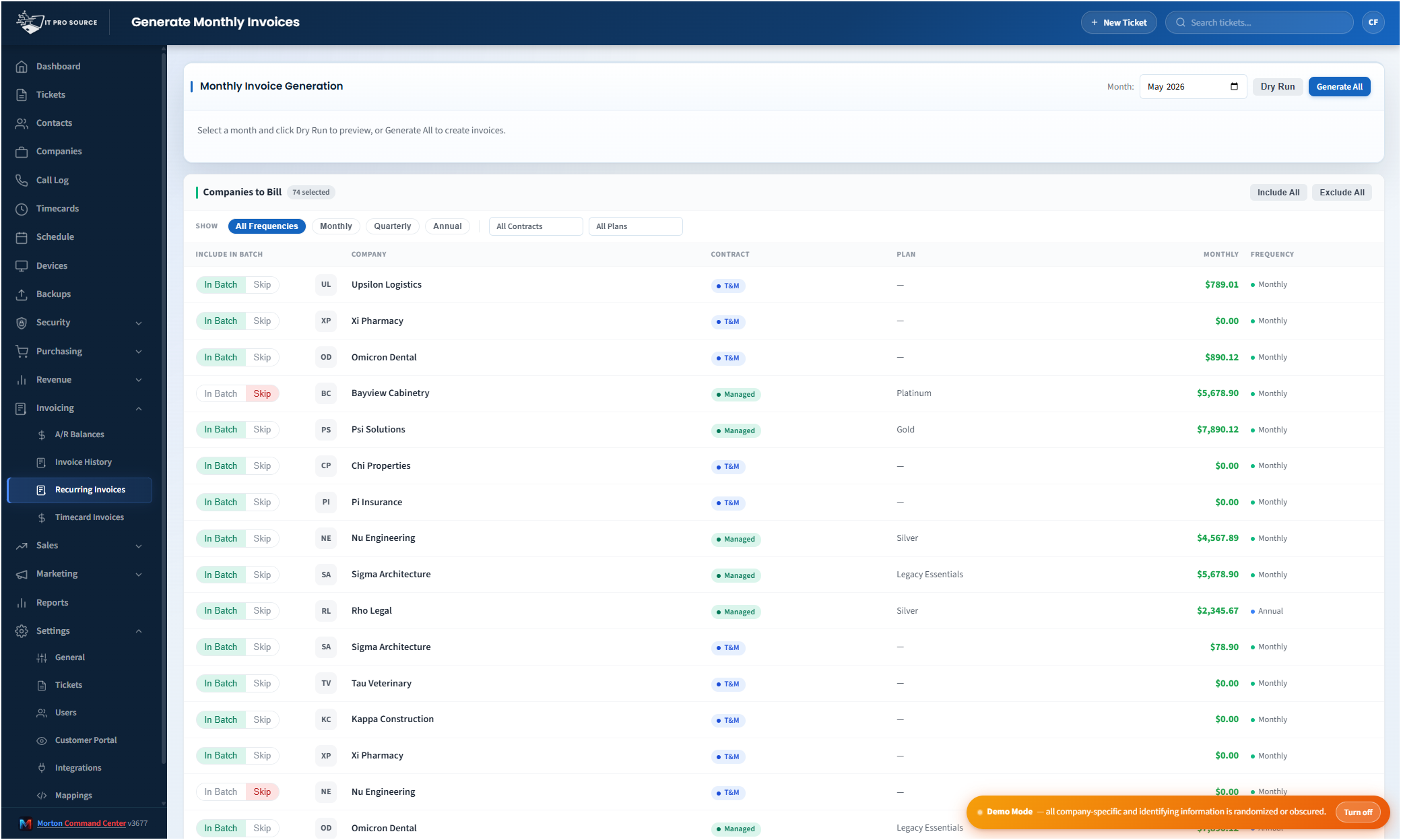
Here's the recurring-billing surface — every client with their plan, contract type, rate, and billing frequency in one place, ready to generate from current device counts before anything is sent.

See it in action
cc.yourmsp.com
Recurring invoices in Morton Command Center — every client listed with their plan, contract type, monthly rate, and billing frequency, ready to generate invoices from current NinjaOne device counts and push to QuickBooks Desktop
Sample layout
Every client and their billing setup in one place — plan, contract type, rate, and billing frequency. Generate the run, scan the queue against current NinjaOne counts, and create the invoices in QuickBooks Desktop.

If you run NinjaOne for RMM and QuickBooks for the books, the gap between them is where billing goes wrong.

NinjaOne knows precisely how many endpoints each client has — it onboards new machines, retires old ones, and tracks the fleet every day. QuickBooks has no idea. So at month-end someone exports a device list, eyeballs it against last month's invoice, updates the quantities by hand, and hopes nothing drifted. Devices get added but never billed. Decommissioned machines keep getting charged until a client notices.

Morton Command Center closes that gap.

It reads device and endpoint counts from NinjaOne, applies your pricing rules, builds the recurring invoice lines, surfaces warnings for anything that needs a look, and — once you approve — creates the finished invoice in QuickBooks Desktop. You stay in control. The platform does the counting, matching, and re-keying.

Both integrations are built for your stack

If your tool has an API, we build the integration — custom to your stack. The NinjaOne and QuickBooks Desktop integrations on this page are built to fit your exact tools as part of your engagement, not picked from a fixed menu.

On the NinjaOne side, Morton Command Center does far more than read counts. The Devices console is genuinely read-write: from inside the platform your techs can reboot machines, run automation scripts, scan and apply patches, start and stop services, and set or clear maintenance windows — all driven through NinjaOne. The same integration that powers those actions supplies the counts your billing runs on, so the numbers come from the system actually doing the work.

On the QuickBooks side, invoice creation is real read-write. Morton Command Center creates invoices in QuickBooks Desktop, generates monthly recurring runs, builds invoices from unbilled timecards, records and voids payments, and tracks A/R aging and balances — all against the QuickBooks company file your bookkeeper already uses. We build your QuickBooks Desktop integration (via Conductor) as part of your build — and because the platform is API-driven, any accounting system with an API (QuickBooks Online, Xero, Sage, or whatever you keep your books in) is built the same way, custom to your stack.

Your tools stay exactly where they are

NinjaOne stays NinjaOne. QuickBooks stays QuickBooks. Morton Command Center reads from both and writes approved invoices back into QuickBooks — there is no data migration and nothing to rip out. The whole platform is built on a vendor-agnostic adapter layer that sits on top of your existing stack, so if you ever stop using Morton Command Center, your NinjaOne data and your QuickBooks books are untouched.

That adapter approach is also how the platform fits your shop exactly. The whole advantage here is that nothing is locked to one rigid pre-wired set of vendors — every integration is built to fit your stack and your workflows. The same loop works against your RMM — NinjaOne, Datto, or whatever you run — and your accounting system — QuickBooks Desktop, QuickBooks Online, Xero, Sage, or anything with an API. Every integration is built custom for you during your build phase rather than forcing you onto someone else's pre-built list. If your tool has an API, we build the integration for it — custom to you. The architecture is designed to unify whatever you run, not to dictate it.

Your bookkeeper reviews the run instead of rebuilding it

At month-end, Morton Command Center assembles a recurring-invoice run for every client. Each invoice arrives pre-filled with the right line items, quantities, and rates, calculated from current NinjaOne counts and your contract rules.

You can preview the whole run as a dry pass first — see exactly what would be created, line by line, before a single invoice is committed to QuickBooks. Your team scans the queue, fixes anything that looks off, and approves. Only then does Morton Command Center create the invoices in QuickBooks Desktop, and it does so idempotently, with server-side validation that each client is mapped to the correct QuickBooks customer — so you don't get duplicates or misfiled invoices.

Nothing gets created blindly. You still control the final invoice. But the repetitive part — exporting, counting, matching, updating, and re-entering — is handled for you.

Catch the revenue that drifts between the two systems

The time savings are obvious — a billing process that took most of a day becomes a short review-and-approve pass. But the bigger win is usually revenue you were already losing.

When the device count lives in NinjaOne and the invoice lives in QuickBooks, the two drift apart every month. A client adds a dozen workstations during a growth spurt and you keep billing the old number. A site gets decommissioned and the charges linger. Each gap is small; across a client base they add up to real money, in both directions.

By generating invoice quantities from live NinjaOne data, Morton Command Center keeps what you bill anchored to what you actually manage. Counts are refreshed on a scheduled sync, with a manual refresh available before a run — so the numbers reflect current reality rather than a stale snapshot. Fewer missed charges, fewer over-charges to walk back, and a billing story you can defend line by line when a client asks why the number changed.

Built for how MSP billing actually works

Per-device managed-services billing is the headline, but few MSP invoices are only that. Morton Command Center assembles the rest of the invoice alongside the NinjaOne counts:

  • Per-endpoint managed-services lines driven by current NinjaOne device totals
  • Billable time turned into invoice lines from your timecards, with after-hours rates applied
  • One-off parts and hardware added as line items when you need to bill outside the recurring run
  • Plan, tier, and contract rules applied per client so quantities price correctly
  • Mid-month changes surfaced for review instead of silently missed

Everything lands in the same review queue, priced and ready, before any invoice is created in QuickBooks.

Near-real-time by design, reviewed by people

NinjaOne counts are kept fresh through scheduled, cron-warmed syncs rather than a constant live pull — which keeps the platform fast and easy on your RMM's API limits. When you want the latest before a run, a manual refresh pulls current numbers on demand. And because every invoice passes through your review step and a dry-run preview, the cadence of the sync never decides what a customer gets billed. People do.

Pricing

Morton Command Center uses transparent flat-rate pricing — no per-seat, per-client, or per-invoice fees. Whether NinjaOne manages 200 endpoints or 20,000, your monthly cost is the same. See current pricing on the homepage →

The Founding Five program is active — the first five customers lock in their rate for the lifetime of their account. See current pricing on the homepage →

Related solutions

Morton Command Center is built around your specific stack. If the NinjaOne-to-QuickBooks loop fits your shop, these adjacent angles probably will too:

Ready to bill straight from your device counts?

If your month-end still starts with a NinjaOne export and ends with hand-edited quantities in QuickBooks, Morton Command Center was built for exactly that gap.

We'll map your NinjaOne organizations to your QuickBooks customers, set up your plans and per-endpoint rates, and show you what a generated invoice run looks like against your real device counts.

One 30-minute call could end the spreadsheet step for good.

Schedule a Consultation

Questions first? Email [email protected] or read the FAQ.